year

2025

timeline

1 month

project

add a feature to an existing app

role

sole UX/UI designer (with mentor support)

sole UX/UI designer (with mentor support)

client

conceptual course project

conceptual course project

Background

Spotify is a leading music streaming platform known for its powerful algorithm-driven personalization. While features like Discover Weekly and Smart Shuffle curate music automatically, users have limited direct control over how their libraries are shuffled.

Spotify is a leading music streaming platform known for its powerful algorithm-driven personalization. While features like Discover Weekly and Smart Shuffle curate music automatically, users have limited direct control over how their libraries are shuffled.

Problem

Research revealed that shuffle is one of Spotify’s most used, and most frustrating, features. Users experience repetition and lack of variety, yet continue relying on it daily. The opportunity: improve shuffle without compromising Spotify’s simplicity or personalization.

Research revealed that shuffle is one of Spotify’s most used, and most frustrating, features. Users experience repetition and lack of variety, yet continue relying on it daily. The opportunity: improve shuffle without compromising Spotify’s simplicity or personalization.

Solution

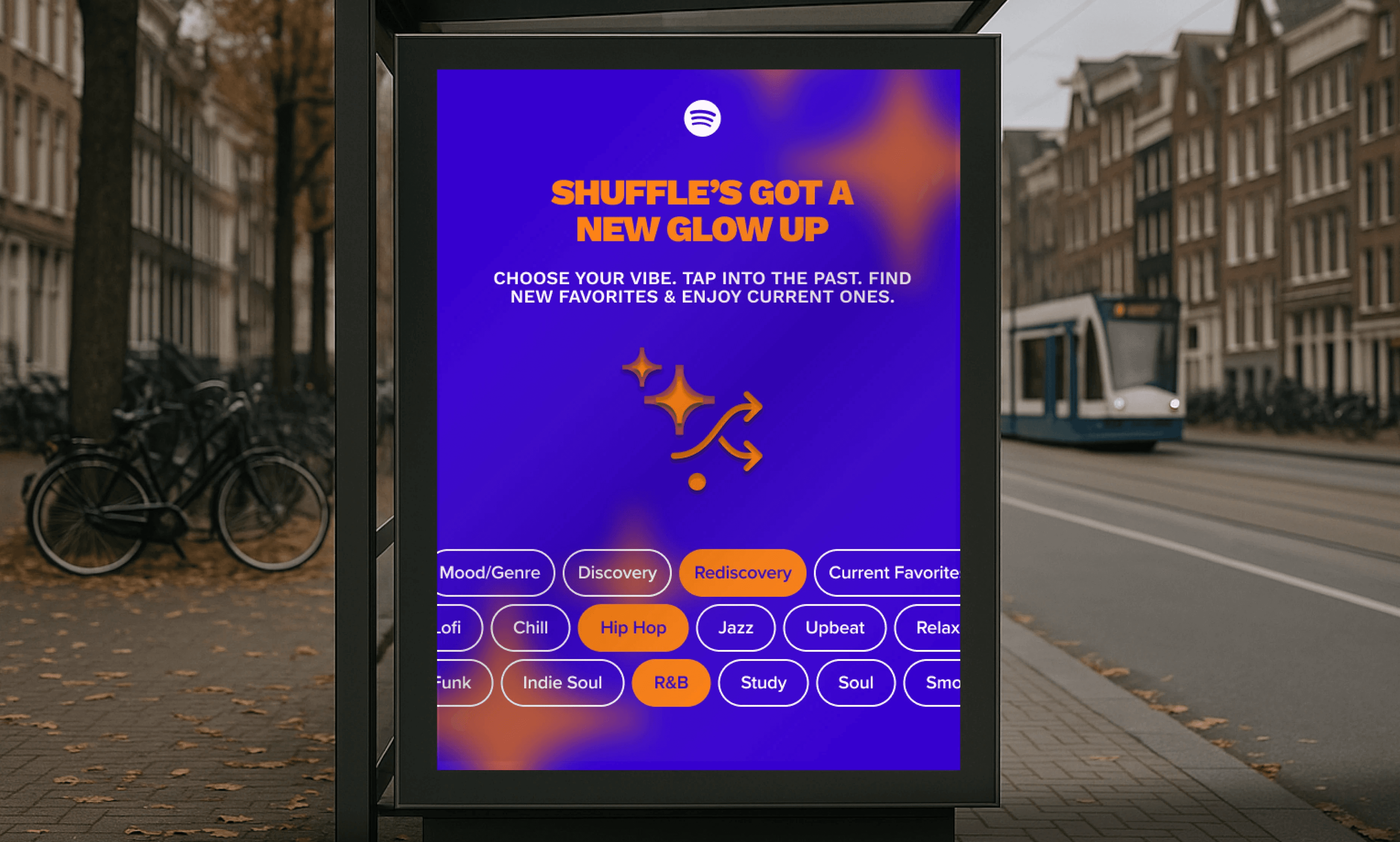
Smart Shuffle Filters: an enhancement that lets users refine shuffle by mood/genre and toggle Discovery, Rediscovery, and Current Favorites. Built within Spotify’s existing design system, the feature adds control without added complexity.

Smart Shuffle Filters: an enhancement that lets users refine shuffle by mood/genre and toggle Discovery, Rediscovery, and Current Favorites. Built within Spotify’s existing design system, the feature adds control without added complexity.

why I built this

why I built this

why I built this

why I built this

I'm an avid Spotify user - music, podcasts, the occasional audiobook on a long hike. When I took on this project it wasn't initially out of personal frustration, but genuine appreciation for the app and the design challenge of improving something already well-built.

I'm an avid Spotify user - music, podcasts, the occasional audiobook on a long hike. When I took on this project it wasn't initially out of personal frustration, but genuine appreciation for the app and the design challenge of improving something already well-built.

I'm an avid Spotify user - music, podcasts, the occasional audiobook on a long hike. When I took on this project it wasn't initially out of personal frustration, but genuine appreciation for the app and the design challenge of improving something already well-built.

I started by reading reviews on Google Play and the App Store. The number one complaint among paid subscribers, by a significant margin, was shuffle. Users felt their saved songs weren't actually being shuffled, only their current top tracks were cycling through. That became the focus.

I started by reading reviews on Google Play and the App Store. The number one complaint among paid subscribers, by a significant margin, was shuffle. Users felt their saved songs weren't actually being shuffled, only their current top tracks were cycling through. That became the focus.

Listening to Spotify's users

Listening to Spotify's users

Research began with user reviews across Google Play, the App Store, and Reddit, where shuffle emerged as the top complaint among paid subscribers, by a significant margin. I looked at Apple Music, YouTube Music, and Amazon Music. Shuffle frustration was wide-reaching across all of them, and none of the platforms allowed users to customize how shuffle behaved by genre, mood, recency, or artist separation. The gap was consistent and clear. Surveys and user interviews were then conducted to understand the root frustrations in depth.

Research began with user reviews across Google Play, the App Store, and Reddit, where shuffle emerged as the top complaint among paid subscribers, by a significant margin. I looked at Apple Music, YouTube Music, and Amazon Music. Shuffle frustration was wide-reaching across all of them, and none of the platforms allowed users to customize how shuffle behaved by genre, mood, recency, or artist separation. The gap was consistent and clear. Surveys and user interviews were then conducted to understand the root frustrations in depth.

key insights

key insights

key insights

1. shuffle is both Spotify's most used AND most complained about feature

1. shuffle is both Spotify's most used AND most complained about feature

1. shuffle is both Spotify's most used AND most complained about feature

1. shuffle is both Spotify's most used AND most complained about feature

2. saved songs get lost in the algorithm

2. saved songs get lost in the algorithm

3. users want to steer the algorithm, not replace it

3. users want to steer the algorithm, not replace it

paying users speak out

paying users speak out

paying users speak out

“Shuffle plays the same 10–15 songs, even in huge playlists. It doesn’t feel random at all.”

Kate

“I just want it to feel like Spotify understands my mood, not just my play history.”

Daniel

“I want to hear the full range of what I’ve saved, not just what I’ve played recently.”

Anthony

“I’d love to mix genres, like hip hop and R&B together, depending on my mood.”

Zach

what I learned

what I learned

what I learned

what I learned

Across reviews on Reddit, Google, and the App Store, premium users repeatedly described shuffle as too repetitive, despite having large libraries. Many felt the algorithm limited what they could hear, burying saved songs and reducing variety. I also realized that while Spotify is strong in algorithmic personalization, it offers very little direct user control beyond single-genre filters.

Across reviews on Reddit, Google, and the App Store, premium users repeatedly described shuffle as too repetitive, despite having large libraries. Many felt the algorithm limited what they could hear, burying saved songs and reducing variety. I also realized that while Spotify is strong in algorithmic personalization, it offers very little direct user control beyond single-genre filters.

why this is important

why this is important

why this is important

why this is important

Users don’t want to replace the algorithm, they want to guide it. When paying subscribers feel disconnected from their own libraries, frustration builds. Adding meaningful control isn’t just a feature improvement, it’s a trust and retention opportunity.

Users don’t want to replace the algorithm, they want to guide it. When paying subscribers feel disconnected from their own libraries, frustration builds. Adding meaningful control isn’t just a feature improvement, it’s a trust and retention opportunity.

persona

persona

persona

Alex, 29, is a grad student and long-time Spotify Premium user who listens daily across work, commuting, and downtime.

Alex, 29, is a grad student and long-time Spotify Premium user who listens daily across work, commuting, and downtime.

Alex, 29, is a grad student and long-time Spotify Premium user who listens daily across work, commuting, and downtime.

She values music that feels emotionally aligned with her mood, blending familiar favorites with meaningful discovery, without having to overthink it. She needs a smarter shuffle experience that reduces repetition, resurfaces forgotten songs, and gives her light, intuitive control over vibe and variety.

She values music that feels emotionally aligned with her mood, blending familiar favorites with meaningful discovery, without having to overthink it. She needs a smarter shuffle experience that reduces repetition, resurfaces forgotten songs, and gives her light, intuitive control over vibe and variety.

She values music that feels emotionally aligned with her mood, blending familiar favorites with meaningful discovery, without having to overthink it. She needs a smarter shuffle experience that reduces repetition, resurfaces forgotten songs, and gives her light, intuitive control over vibe and variety.

“I just want shuffle to understand my vibe, surprise me a little, and actually play the songs I forgot I loved.”

“I just want shuffle to understand my vibe, surprise me a little, and actually play the songs I forgot I loved.”

“I just want shuffle to understand my vibe, surprise me a little, and actually play the songs I forgot I loved.”

Defining the problems

Defining the problems

Research revealed that shuffle is one of Spotify’s most-used features, and also one of its biggest frustrations. Users feel stuck hearing the same songs, unable to access the full depth of their libraries, and limited by filters that don’t reflect their mood or intent. This pointed to a clear opportunity: design a smarter shuffle experience that balances discovery and rediscovery, adds lightweight user control, and enhances personalization without increasing complexity. Doing so could improve daily engagement, strengthen loyalty, and reinforce Spotify’s promise of truly personalized listening.

Research revealed that shuffle is one of Spotify’s most-used features, and also one of its biggest frustrations. Users feel stuck hearing the same songs, unable to access the full depth of their libraries, and limited by filters that don’t reflect their mood or intent. This pointed to a clear opportunity: design a smarter shuffle experience that balances discovery and rediscovery, adds lightweight user control, and enhances personalization without increasing complexity. Doing so could improve daily engagement, strengthen loyalty, and reinforce Spotify’s promise of truly personalized listening.

problems + HMWs

problems + HMWs

problems + HMWs

1. shuffle doesn't feel truly random

1. shuffle doesn't feel truly random

Users expect shuffle to surface their full library, but it favors recently played tracks, limiting variety and reducing trust.

Users expect shuffle to surface their full library, but it favors recently played tracks, limiting variety and reducing trust.

How might we create a shuffle experience that feels genuinely random while still maintaining relevance?

How might we create a shuffle experience that feels genuinely random while still maintaining relevance?

How might we create a shuffle experience that feels genuinely random while still maintaining relevance?

2. personalization without control

2. personalization without control

Users want simple ways to guide shuffle, including combining genres and mood-based options, without adding friction.

Users want simple ways to guide shuffle, including combining genres and mood-based options, without adding friction.

How might we give users simple, intuitive ways to shape shuffle by genre and mood without disrupting flow?

How might we give users simple, intuitive ways to shape shuffle by genre and mood without disrupting flow?

How might we give users simple, intuitive ways to shape shuffle by genre and mood without disrupting flow?

3. discovery & rediscovery feel unbalanced

3. discovery & rediscovery feel unbalanced

Shuffle under-delivers on resurfacing forgotten favorites, instead prioritizing new tracks influenced by recent listening.

Shuffle under-delivers on resurfacing forgotten favorites, instead prioritizing new tracks influenced by recent listening.

How might we intentionally balance new discoveries with long-unheard favorites within shuffle?

How might we intentionally balance new discoveries with long-unheard favorites within shuffle?

How might we intentionally balance new discoveries with long-unheard favorites within shuffle?

Exploring the problems

Exploring the problems

With research findings in hand, the direction became clear: this wasn't about replacing what Spotify had built, it was about adding one thoughtful layer on top of it. Users weren't asking for a new product. They were asking to be heard by the one they already loved. Every design decision that followed had to earn its place within a system that users already trusted and had high expectations for.

With research findings in hand, the direction became clear: this wasn't about replacing what Spotify had built, it was about adding one thoughtful layer on top of it. Users weren't asking for a new product. They were asking to be heard by the one they already loved. Every design decision that followed had to earn its place within a system that users already trusted and had high expectations for.

With research findings in hand, the direction became clear: this wasn't about replacing what Spotify had built, it was about adding one thoughtful layer on top of it. Users weren't asking for a new product. They were asking to be heard by the one they already loved. Every design decision that followed had to earn its place within a system that users already trusted and had high expectations for.

early directions

early directions

early directions

Initial brainstorming kept the core insights separate: resurfacing long-unheard saved songs, maintaining discovery based on saved genres, allowing multiple genre/mood selections (Spotify currently limits this to one), and giving users control over whether current favorites were included or deprioritized. Early concepts treated these as distinct features.

I eventually funneled them into one layered feature: Smart Shuffle Filters. A second feature had also been in development: a "vibe check" where users could rate each song as good, meh, or bad to further influence the algorithm over time. After careful consideration, I cut it. Smart Shuffle Filters was already layered enough to address the core pain points well, and adding a second feature risked diluting the MVP focus.

AI was used throughout, starting with data discovery during research, research synthesis, and early brainstorming to pressure-test which directions were worth pursuing.
Designing the new feature

Designing the new feature

With clear problem statements and HMWs in place, these insights were translated into a focused feature addition that strengthened shuffle without overcomplicating it.

With clear problem statements and HMWs in place, these insights were translated into a focused feature addition that strengthened shuffle without overcomplicating it.

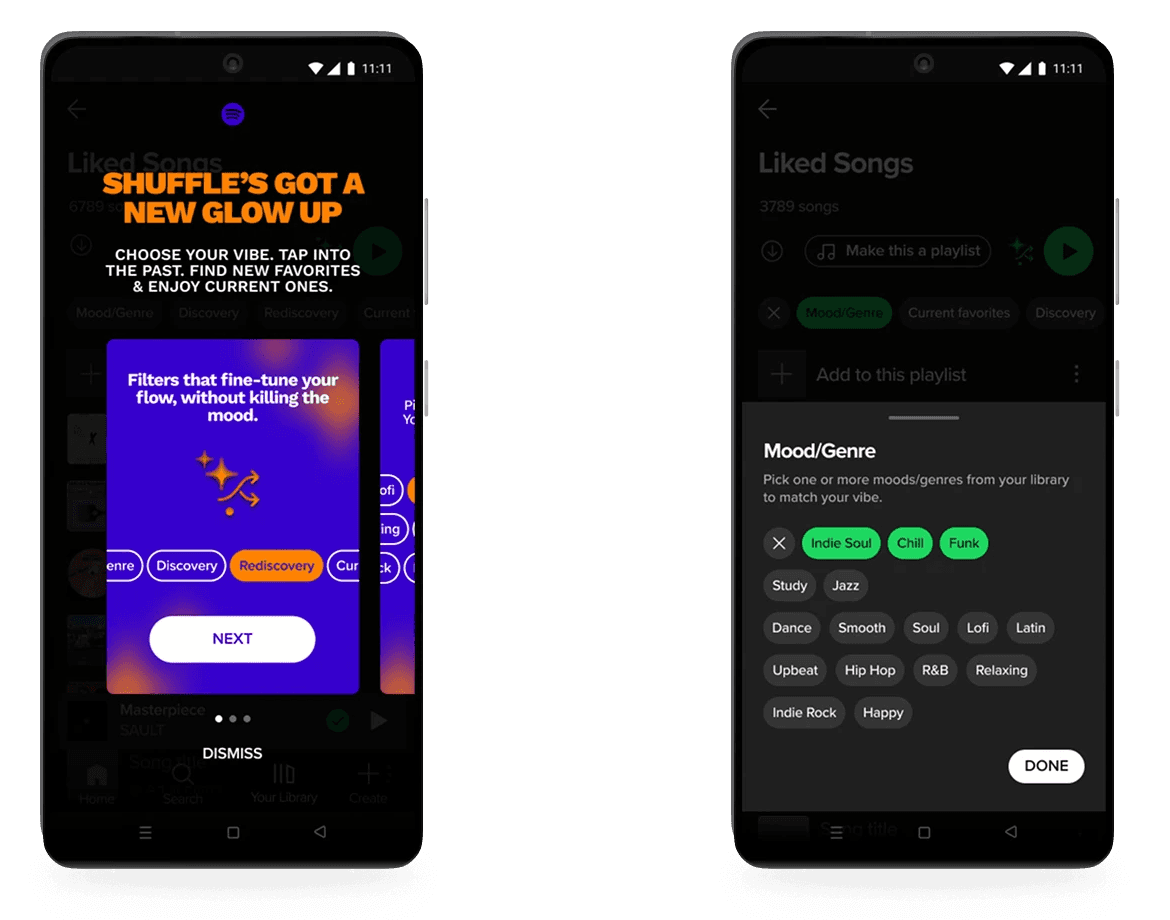
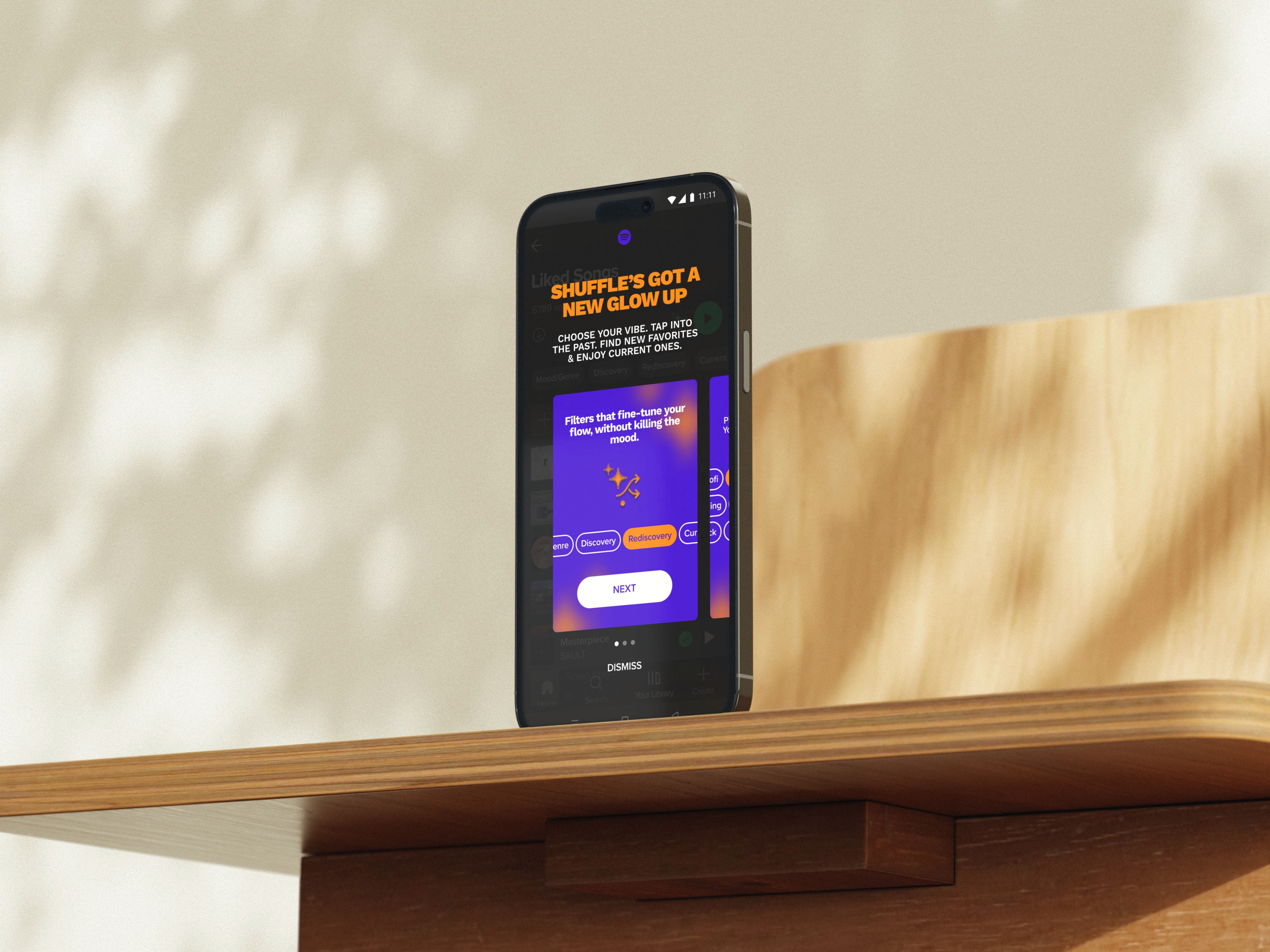
The result is Smart Shuffle Filters: a lightweight layer of user control that allows listeners to guide shuffle by selecting multiple moods/genres and refining results through Discovery, Rediscovery, or Current Favorites.

The result is Smart Shuffle Filters: a lightweight layer of user control that allows listeners to guide shuffle by selecting multiple moods/genres and refining results through Discovery, Rediscovery, or Current Favorites.

The result is Smart Shuffle Filters: a lightweight layer of user control that allows listeners to guide shuffle by selecting multiple moods/genres and refining results through Discovery, Rediscovery, or Current Favorites.

The feature was designed to reduce repetition and restore a sense of agency, while working seamlessly within Spotify's existing system.

The feature was designed to reduce repetition and restore a sense of agency, while working seamlessly within Spotify's existing system.

new feature

new feature

new feature

Smart Shuffle Filters

Smart Shuffle Filters

Smart Shuffle Filters

Smart Shuffle Filters is a guided shuffle experience that helps users move from passive listening to intentional discovery.

Smart Shuffle Filters is a guided shuffle experience that helps users move from passive listening to intentional discovery.

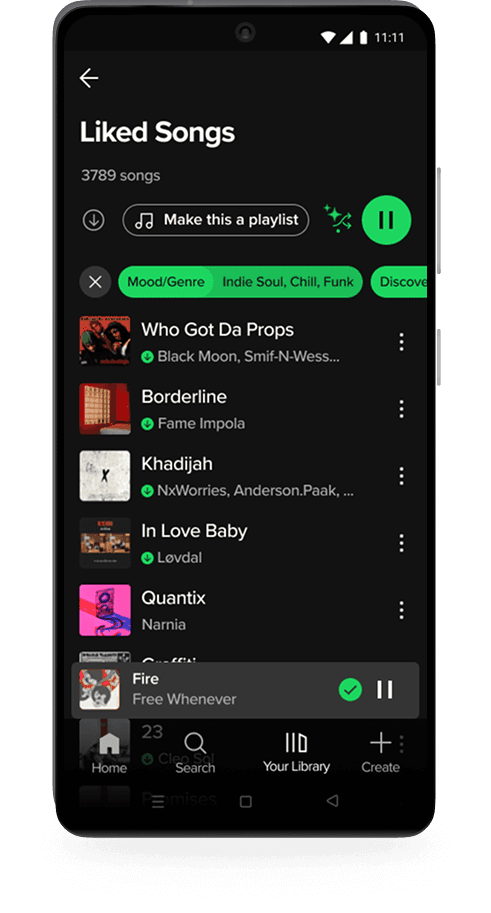
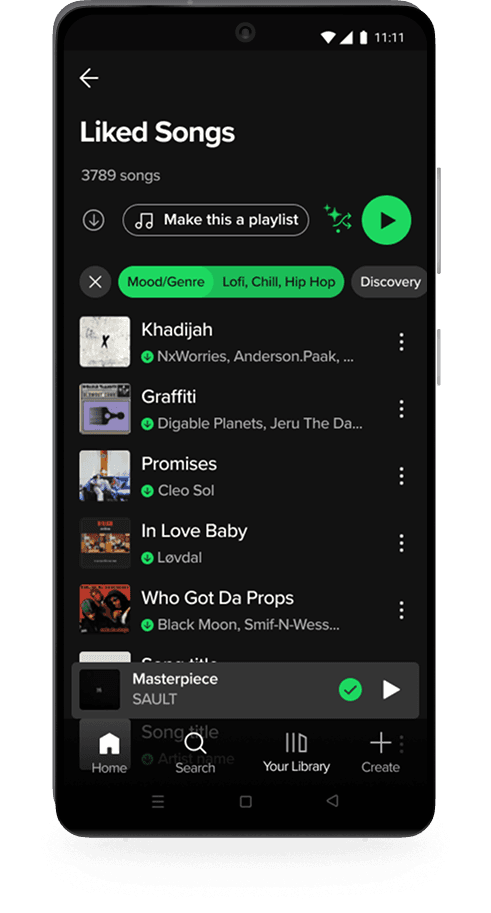
After tapping shuffle, listeners can select multiple moods or genres and refine their session with options like Discovery, Rediscovery, or Current Favorites. This allows them to shape the vibe, surface forgotten songs, and reduce repetition.

After tapping shuffle, listeners can select multiple moods or genres and refine their session with options like Discovery, Rediscovery, or Current Favorites. This allows them to shape the vibe, surface forgotten songs, and reduce repetition.

Smart Shuffle Filters flow

Smart Shuffle Filters flow

Smart Shuffle Filters flow

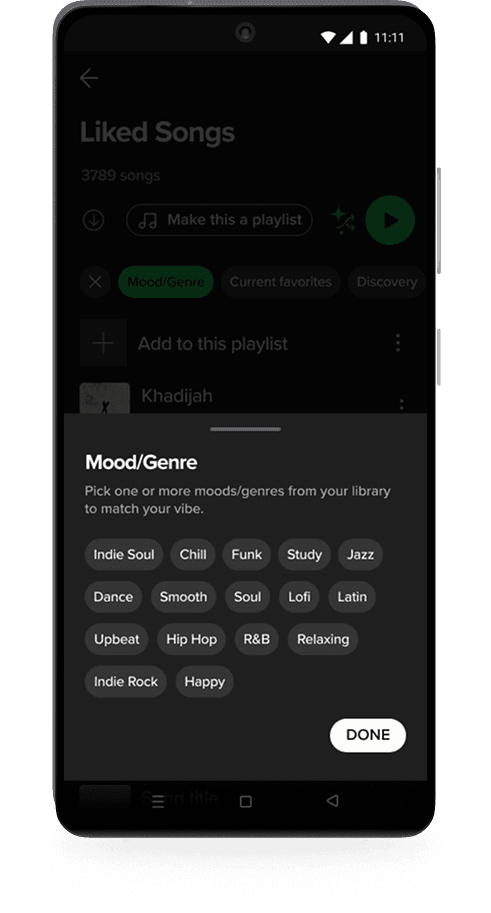
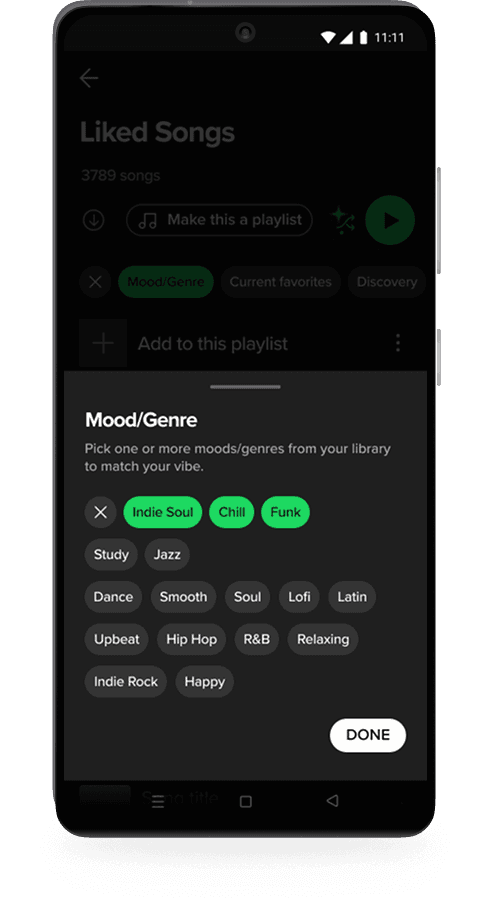
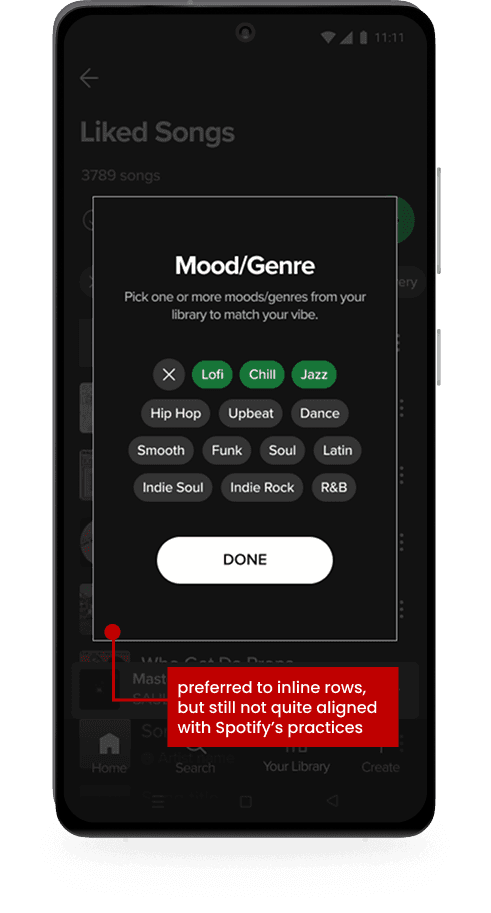
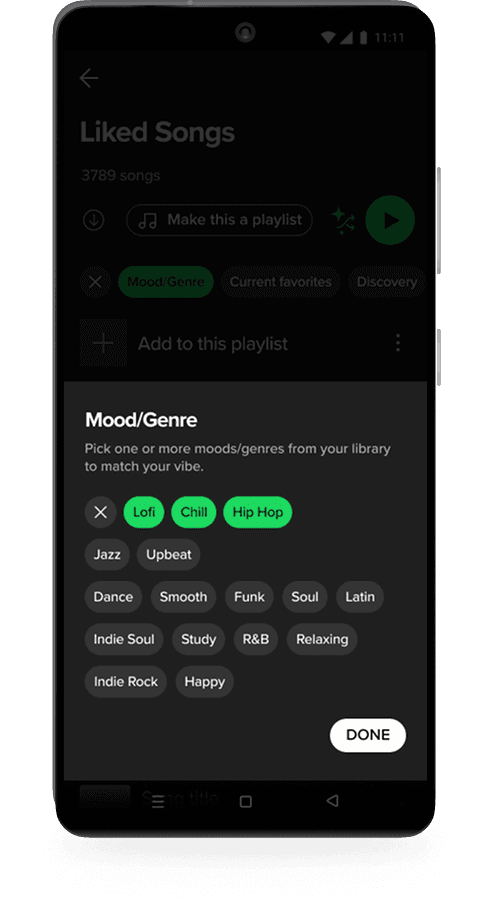
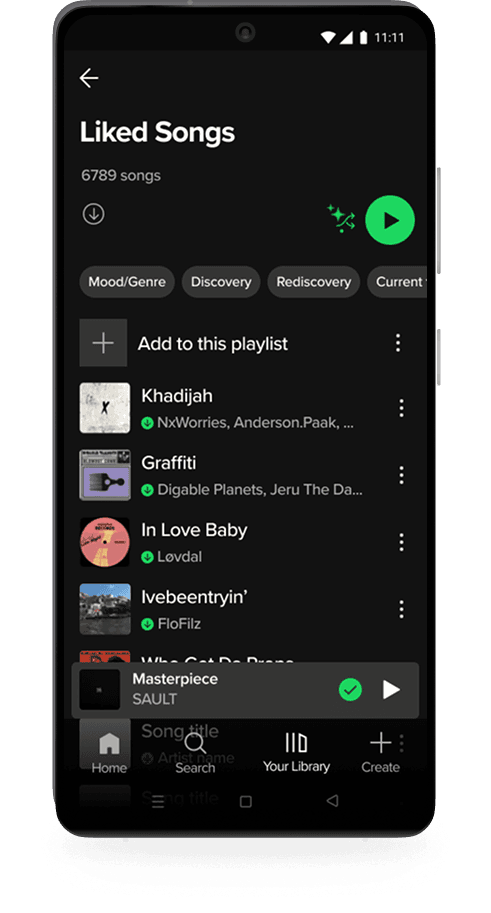
Users begin in their Liked Songs by tapping the updated Smart Shuffle icon, which is an evolution of the existing feature. Once activated, four filter options appear inline in a format familiar to Spotify’s UI. If users select Mood/Genre, a drawer slides up displaying the moods and genres already present in their library, allowing for multiple selections.
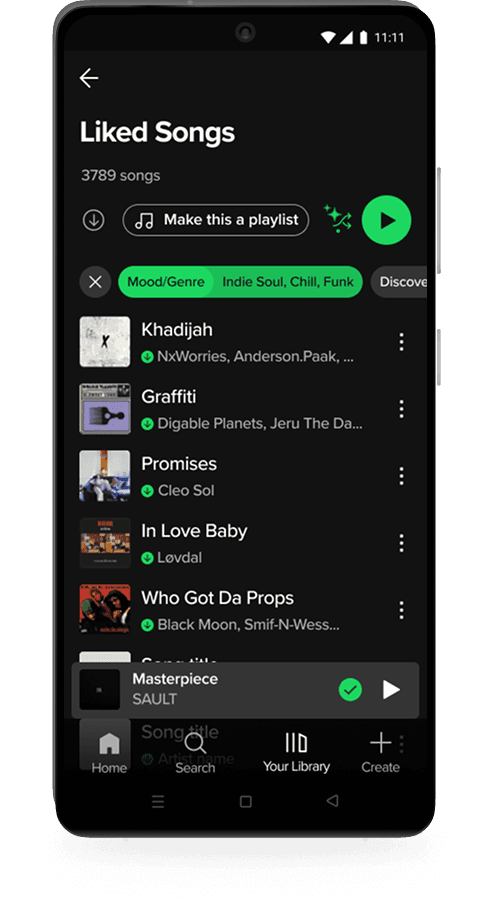
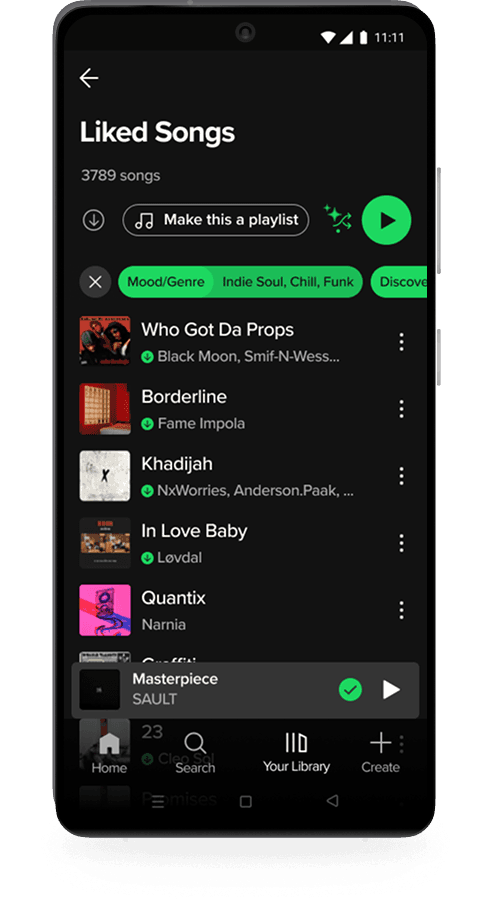
After confirming their choices, they can further refine their session with Discovery, Rediscovery, or Current Favorites. Each act as lightweight toggles.
Together, these filters let users shape not only the vibe of their shuffle, but also the balance between new finds, forgotten tracks, and recent favorites. Users can apply one filter or combine several, creating a listening experience that feels both personalized and intentional, while remaining simple and familiar.

Together, these filters let users shape not only the vibe of their shuffle, but also the balance between new finds, forgotten tracks, and recent favorites. Users can apply one filter or combine several, creating a listening experience that feels both personalized and intentional, while remaining simple and familiar.

Testing the new feature

Testing the new feature

Testing was conducted across mid- and high-fidelity stages to evaluate Smart Shuffle Filters within the Liked Songs flow. Participants shuffled their library, explored the filter options, interpreted their meaning, and cleared selections independently. Sessions focused on discoverability, filter clarity, interaction logic, and ease of undoing actions.

Testing was conducted across mid- and high-fidelity stages to evaluate Smart Shuffle Filters within the Liked Songs flow. Participants shuffled their library, explored the filter options, interpreted their meaning, and cleared selections independently. Sessions focused on discoverability, filter clarity, interaction logic, and ease of undoing actions.

what needed work

what needed work

what needed work

what needed work

problem

problem

solution

solution

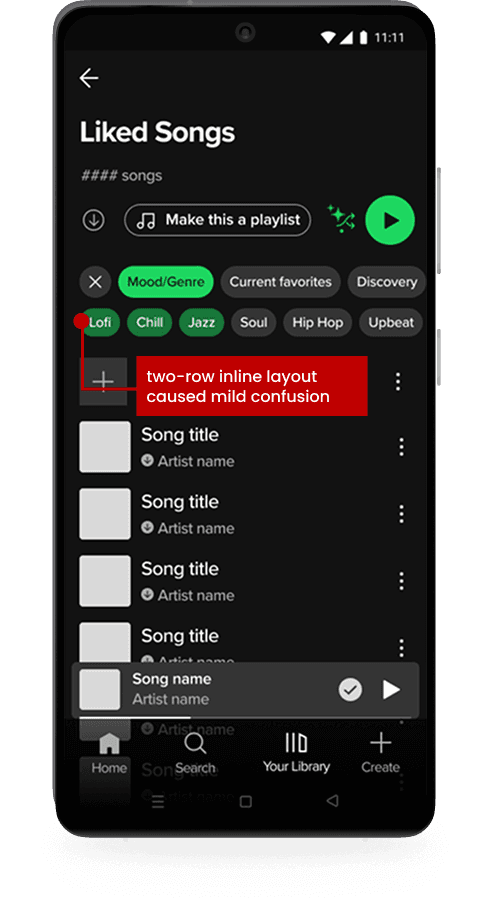
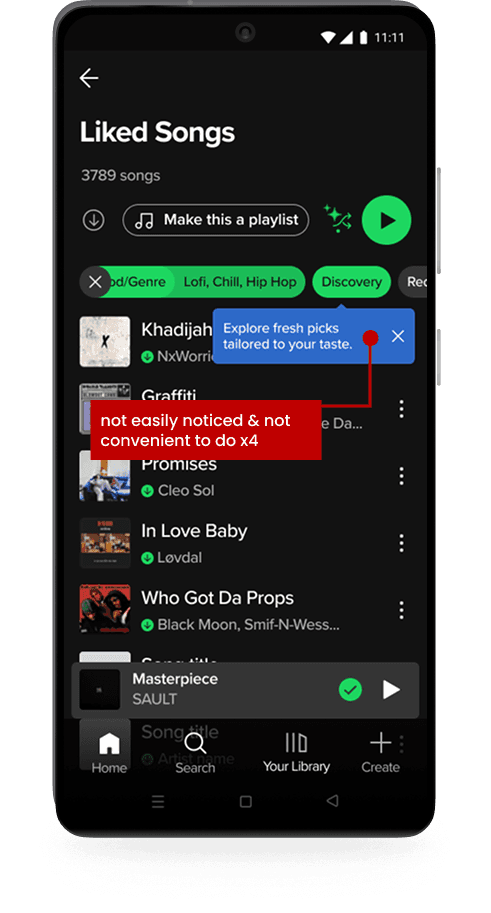
Mid-fidelity testing revealed the mood/genre filter needed refinement. A two-row inline layout caused confusion, while a modal view improved clarity for most users. To better align with Spotify's established patterns, a drawer interaction was implemented with visible applied tags for feedback and reassurance. In high-fidelity testing, all five participants reported the updated filter felt native to Spotify.
problem
solution
solution
solution

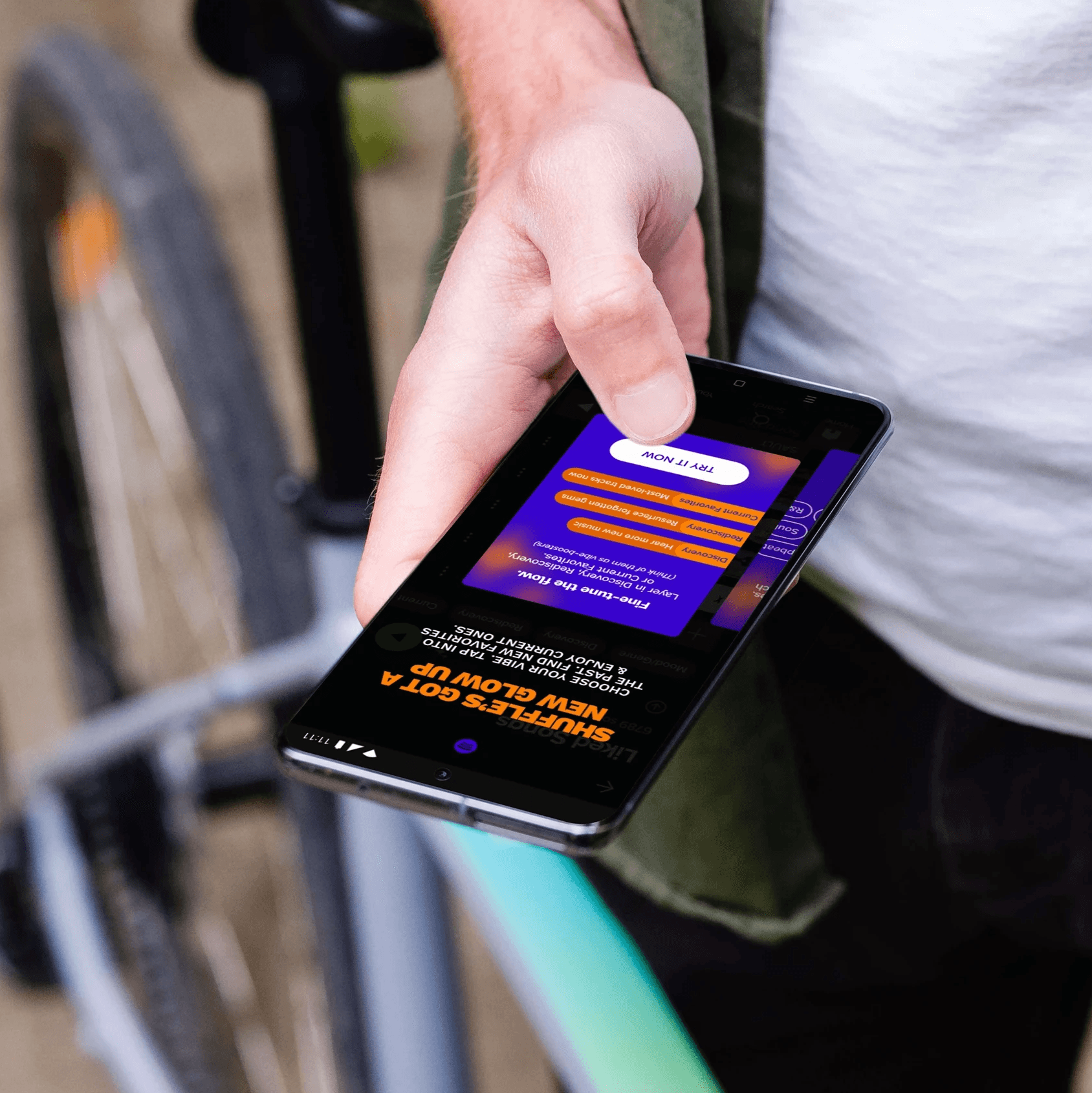
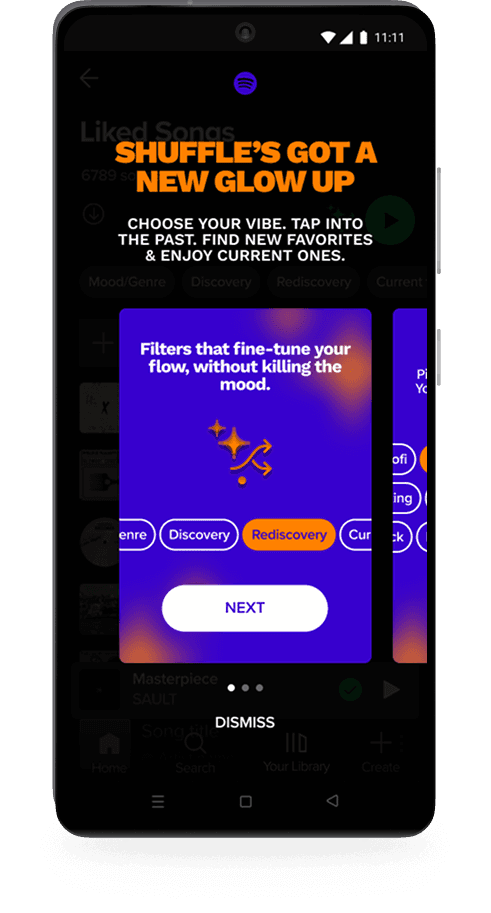
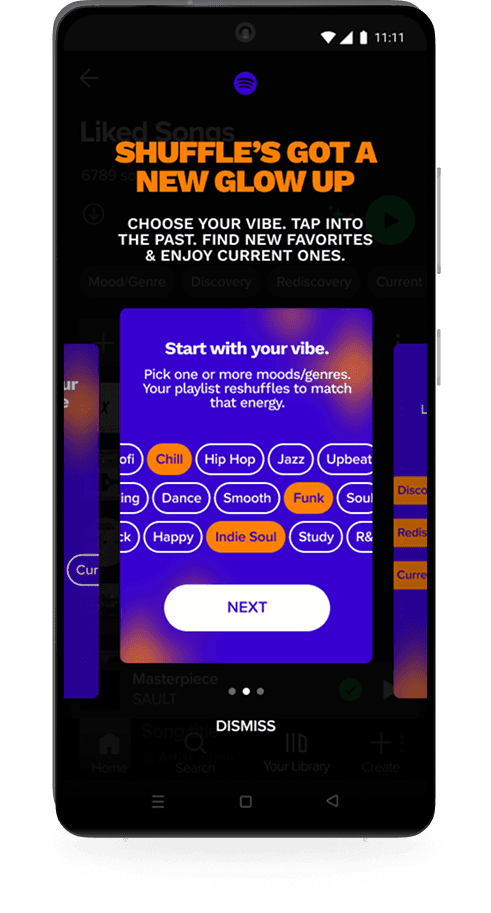
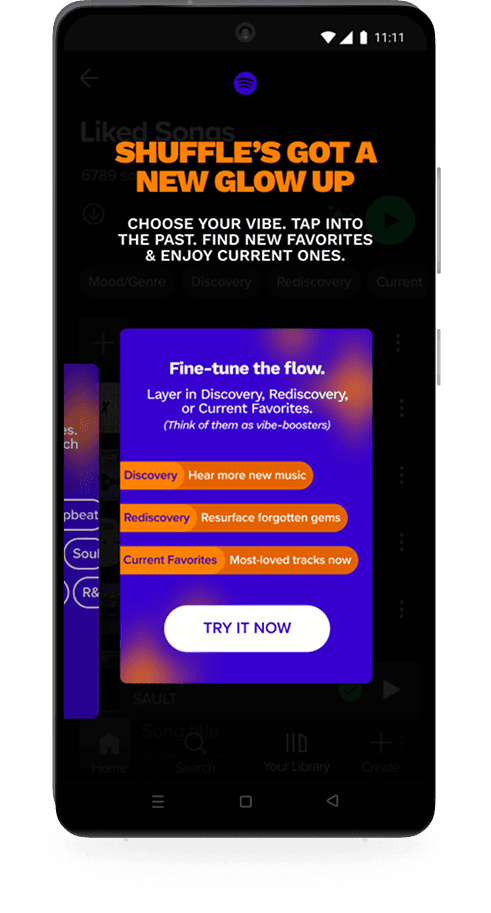
Tooltips were clear but passive for a feature that meaningfully expands Smart Shuffle. An onboarding carousel modal replaced them, using familiar card-based UI to introduce the new flow more intentionally.

what worked

what worked

what worked

what worked

1. native, intuitive, & immediately recognizable

1. native, intuitive, & immediately recognizable

  • 100% of users noticed the new options after tapping shuffle and understood how to use Mood/Genre without guidance.

  • all participants praised the ability to select multiple moods/genres

2. clear interaction logic

2. clear interaction logic

  • users correctly interpreted filter names and purposes (100%)

  • 80% independently understood that Discovery, Rediscovery, and Current Favorites refine within the selected Mood/Genre pool

3. high-perceived value

3. high-perceived value

  • 5/5 users during high-fidelity testing reported they'd use the feature in real life, expressing strong interest in having more shuffle control

  • several participants noted they would use shuffle more frequently if this feature existed

project results

project results

project results

project results

Smart Shuffle Filters enhanced personalization by reducing repetition, supporting rediscovery, and giving users simple, meaningful control over their listening experience. Testing showed it felt intuitive, native to Spotify, and aligned with how users want to listen.

view prototype

Reflections

Reflections

challenges

challenges

challenges

challenges

Designing within Spotify's existing system was less intimidating than expected. Adopting their UI meant faster decisions and a smaller drawing board. The real challenge was designing a feature worthy of a highly polished, high-expectation product, and ensuring it would be technically feasible within what Spotify had already built rather than requiring significant new development. The hardest design problem was consolidating four filter concepts into one cohesive feature that still felt simple and native. An early version displayed multiple rows of options directly on screen, but it took up too much real estate and felt clunky. Users already have high standards for Spotify. It needed to feel like it had always been there. The modal vs. drawer decision came from testing, where users felt something was off with the modal interaction but couldn't articulate why. Going back into the app myself made the answer clear: modals are used for onboarding new features in Spotify's UI, while drawers are used for selections. A small distinction, but the kind that separates something that feels native from something that doesn't.

what I learned

what I learned

what I learned

what I learned

This project strengthened my ability to design within an existing system and make new features feel native rather than bolted on. Working within Spotify's constraints was clarifying rather than limiting. It narrowed the decision space and pushed me toward solutions that had to earn their place. I learned to balance user needs with technical feasibility, and that early research is the difference between designing something users want and designing something that sounds good in theory.

how I can do better

how I can do better

how I can do better

how I can do better

I can improve by validating ideas earlier and stress-testing feasibility at the concept stage. Recruiting testers sooner and anticipating system constraints upfront will help me move faster and design more strategically.


next steps

next steps

next steps

next steps

Future iterations could expand filter options (year, language, top-played) and allow users to save custom filter combinations. Improving queue visibility could further reinforce clarity and trust in shuffle behavior.

Future iterations could expand filter options (year, language, top-played) and allow users to save custom filter combinations. Improving queue visibility could further reinforce clarity and trust in shuffle behavior.

THANK YOU FOR EXPLORING MY WORK ~

Please reach out, I'd love to chat.

Please reach out, I'd love to chat.