Inner Bloom

A supportive pregnancy platform designed to reduce overwhelm and provide clarity through personalized guidance

view project

view project

year

2025

timeline

3 months

project

end-to-end UX/UI (mobile-first)

role

sole end-to-end UX/UI designer (with mentor support)

sole end-to-end UX/UI designer (with mentor support)

client

conceptual course project

conceptual course project

Problem

Expecting mothers often turn to online resources for pregnancy information, but are met with an overwhelming volume of generalized, fragmented content. Without clear guidance on what is relevant to their current stage or symptoms, many experience confusion, anxiety, and decision fatigue when trying to understand what’s normal and what requires attention.

Expecting mothers often turn to online resources for pregnancy information, but are met with an overwhelming volume of generalized, fragmented content. Without clear guidance on what is relevant to their current stage or symptoms, many experience confusion, anxiety, and decision fatigue when trying to understand what’s normal and what requires attention.

Solution

Inner Bloom is a personalized pregnancy information platform designed to reduce overwhelm by delivering timely, relevant guidance based on users’ daily symptoms and pregnancy stage. It combines concise medical insights with shared peer experiences, helping users quickly access trustworthy information while feeling supported and reassured throughout their journey.

Inner Bloom is a personalized pregnancy information platform designed to reduce overwhelm by delivering timely, relevant guidance based on users’ daily symptoms and pregnancy stage. It combines concise medical insights with shared peer experiences, helping users quickly access trustworthy information while feeling supported and reassured throughout their journey.

why I built this

why I built this

why I built this

why I built this

This was my first course project. As I browsed the prompt options, I looked down at the small bump beginning to form and knew immediately what I wanted to design for.

This was my first course project. As I browsed the prompt options, I looked down at the small bump beginning to form and knew immediately what I wanted to design for.

This was my first course project. As I browsed the prompt options, I looked down at the small bump beginning to form and knew immediately what I wanted to design for.

I was in the thick of it - excited but also scared, overwhelmed by the sheer volume of pregnancy information and unsure where to begin. Nothing I'd gathered from friends and family had prepared me for it. I wanted to know wehether other expecting mothers felt the same way. So I combined the two things consuming most of my mental space and made it my first project.

I was in the thick of it - excited but also scared, overwhelmed by the sheer volume of pregnancy information and unsure where to begin. Nothing I'd gathered from friends and family had prepared me for it. I wanted to know wehether other expecting mothers felt the same way. So I combined the two things consuming most of my mental space and made it my first project.

Listening to expecting mothers

Listening to expecting mothers

Research focused on understanding how expecting mothers navigate pregnancy information and where overwhelm occurs. Insights were gathered through Reddit and Facebook community forums, competitive analysis, surveys, and user interviews to build a clear picture of the informational needs, emotional triggers, and trust signals that shape the pregnancy information experience.

Research focused on understanding how expecting mothers navigate pregnancy information and where overwhelm occurs. Insights were gathered through Reddit and Facebook community forums, competitive analysis, surveys, and user interviews to build a clear picture of the informational needs, emotional triggers, and trust signals that shape the pregnancy information experience.

key insights

key insights

key insights

1. information overload creates anxiety & decision fatigue

1. information overload creates anxiety & decision fatigue

1. information overload creates anxiety & decision fatigue

1. information overload creates anxiety & decision fatigue

2. trust requires both medical accuracy & real-life experiences

2. trust requires both medical accuracy & real-life experiences

3. personalization & digestibility are essential

3. personalization & digestibility are essential

mothers' voices

mothers' voices

mothers' voices

The issue is that there's too much info out there, and it’s tedious and frustrating to sort through what applies to you.

Melody, mom of two

Hearing from other women who have gone through the same experiences helps.

survey participant

I just want to know what matters for me, without spending hours Googling.

Lydia, mom of two

I would take the medical information I found and search other sites to compare it to what other moms were saying.

Anna, mom of one

what I learned

what I learned

what I learned

what I learned

I learned that the issue is not a lack of information, but how overwhelming and impersonal it can feel. Expecting mothers need guidance that is clear, relevant to their experience, and supported by both medical expertise and real-life perspectives.

I learned that the issue is not a lack of information, but how overwhelming and impersonal it can feel. Expecting mothers need guidance that is clear, relevant to their experience, and supported by both medical expertise and real-life perspectives.

why it's important

why it's important

why it's important

why it's important

When information is difficult to navigate, it increases anxiety and makes decision-making more stressful. A more personalized and digestible experience helps users feel informed, reassured, and confident.

When information is difficult to navigate, it increases anxiety and makes decision-making more stressful. A more personalized and digestible experience helps users feel informed, reassured, and confident.

personas

personas

personas

Naomi, 31, is a brand manager navigating pregnancy for the first time.

Naomi, 31, is a brand manager navigating pregnancy for the first time.

Naomi, 31, is a brand manager navigating pregnancy for the first time.

She values clarity, reassurance, and a balance of expert advice and real-life experiences. She needs a trustworthy, easy-to-use resource that provides digestible information and helps her feel confident in her decisions.

She values clarity, reassurance, and a balance of expert advice and real-life experiences. She needs a trustworthy, easy-to-use resource that provides digestible information and helps her feel confident in her decisions.

She values clarity, reassurance, and a balance of expert advice and real-life experiences. She needs a trustworthy, easy-to-use resource that provides digestible information and helps her feel confident in her decisions.

“I just want to know if what I’m experiencing is normal.”

“I just want to know if what I’m experiencing is normal.”

“I just want to know if what I’m experiencing is normal.”

Layla, 40, is a marketing executive expecting her second child while balancing a full-time job and caring for a toddler.

Layla, 40, is a marketing executive expecting her second child while balancing a full-time job and caring for a toddler.

She values efficiency, clarity, and medically verified information that fits seamlessly into her busy routine. She needs quick and personalized guidance, easy navigation, and access to trustworthy insights without spending time sorting through conflicting advice.

She values efficiency, clarity, and medically verified information that fits seamlessly into her busy routine. She needs quick and personalized guidance, easy navigation, and access to trustworthy insights without spending time sorting through conflicting advice.

“I don’t have time to sift through 10 articles. I need answers now.”

“I don’t have time to sift through 10 articles. I need answers now.”

“I don’t have time to sift through 10 articles. I need answers now.”

Defining the problems

Defining the problems

Research revealed that pregnancy information is often scattered and fragmented, leading to overwhelm, anxiety, and difficulty finding relevant guidance. These insights were synthesized into problem statements and “How Might We” questions focused on improving clarity, personalization, and trust. This informed the project goals and MVP scope, ensuring the experience addressed key user needs of reducing overwhelm and supporting confident decision-making.

Research revealed that pregnancy information is often scattered and fragmented, leading to overwhelm, anxiety, and difficulty finding relevant guidance. These insights were synthesized into problem statements and “How Might We” questions focused on improving clarity, personalization, and trust. This informed the project goals and MVP scope, ensuring the experience addressed key user needs of reducing overwhelm and supporting confident decision-making.

problems + HMWs

problems + HMWs

problems + HMWs

1. information overload & lack of relevance

1. information overload & lack of relevance

Too much generalized information makes it difficult for users to find what applies to their specific stage and symptoms.

Too much generalized information makes it difficult for users to find what applies to their specific stage and symptoms.

How might we deliver personalized, relevant information that reduces overwhelm and increases clarity?

How might we deliver personalized, relevant information that reduces overwhelm and increases clarity?

How might we deliver personalized, relevant information that reduces overwhelm and increases clarity?

2. lack of trust in medical information

2. lack of trust in medical information

Conflicting sources and unclear credibility make it hard for users to feel confident in the accuracy of what they’re reading.

Conflicting sources and unclear credibility make it hard for users to feel confident in the accuracy of what they’re reading.

How might we provide trustworthy, expert-backed guidance that users can rely on with confidence?

How might we provide trustworthy, expert-backed guidance that users can rely on with confidence?

How might we provide trustworthy, expert-backed guidance that users can rely on with confidence?

3. disconnection from real experiences

3. disconnection from real experiences

Users struggle to find relatable, real-life experiences that validate and contextualize medical advice.

Users struggle to find relatable, real-life experiences that validate and contextualize medical advice.

How might we connect users with others who share similar experiences to foster reassurance and support?

How might we connect users with others who share similar experiences to foster reassurance and support?

How might we connect users with others who share similar experiences to foster reassurance and support?

Exploring the problems

Exploring the problems

With research findings in hand, the design direction became clear: the problem wasn't a lack of pregnancy information - it was everything about how that information was being delivered. Too much, too generalized, and disconnected from what a user was actually experiencing in that moment. Every design decision that followed was filtered through one question: how do we make the right information feel findable, personal, and safe to receive?

With research findings in hand, the design direction became clear: the problem wasn't a lack of pregnancy information - it was everything about how that information was being delivered. Too much, too generalized, and disconnected from what a user was actually experiencing in that moment. Every design decision that followed was filtered through one question: how do we make the right information feel findable, personal, and safe to receive?

With research findings in hand, the design direction became clear: the problem wasn't a lack of pregnancy information - it was everything about how that information was being delivered. Too much, too generalized, and disconnected from what a user was actually experiencing in that moment. Every design decision that followed was filtered through one question: how do we make the right information feel findable, personal, and safe to receive?

learning from the existing landscape

learning from the existing landscape

learning from the existing landscape

I downloaded and used four apps throughout the project: BabyCenter, What to Expect, Clue, and Flo. Studying them as an actual pregnant user gave me a perspective most competitive analyses don't have.

BabyCenter and What to Expect were too vast - overwhelming volumes of content loosely connected to where a user actually was. Clue and Flow were more digestible but felt secondary as pregnancy tools. Flo connected symptoms to medical information but offered only a handful of symptom options at a time. Clue had an extensive symptom list but generated no personalized guidance from it. None of the four connected community experiences directly to medical advice - which research had identified as the most important unmet need.

Reddit and Facebook groups filled that gap organically. Women sharing experiences with others in similar situations created a sense of validation no app was replicating. 'I'm not alone, this is normal' - that feeling all in one place was what I wanted to design toward.
Designing the experience

Designing the experience

With clear problem statements, HMWs, and project goals in place, these insights were translated into a focused MVP that addressed information overload, lack of personalization, and the need for reassurance.

With clear problem statements, HMWs, and project goals in place, these insights were translated into a focused MVP that addressed information overload, lack of personalization, and the need for reassurance.

This resulted in three core features: Symptom Tracker, Chronology Tracker, and Advice Meets Experience.

This resulted in three core features: Symptom Tracker, Chronology Tracker, and Advice Meets Experience.

This resulted in three core features: Symptom Tracker, Chronology Tracker, and Advice Meets Experience.

Together, these were designed to deliver relevant, digestible guidance while bridging expert advice with real-life experience.

Together, these were designed to deliver relevant, digestible guidance while bridging expert advice with real-life experience.

MVP feature 1

MVP feature 1

MVP feature 1

Symptom Tracker

Symptom Tracker

Symptom Tracker

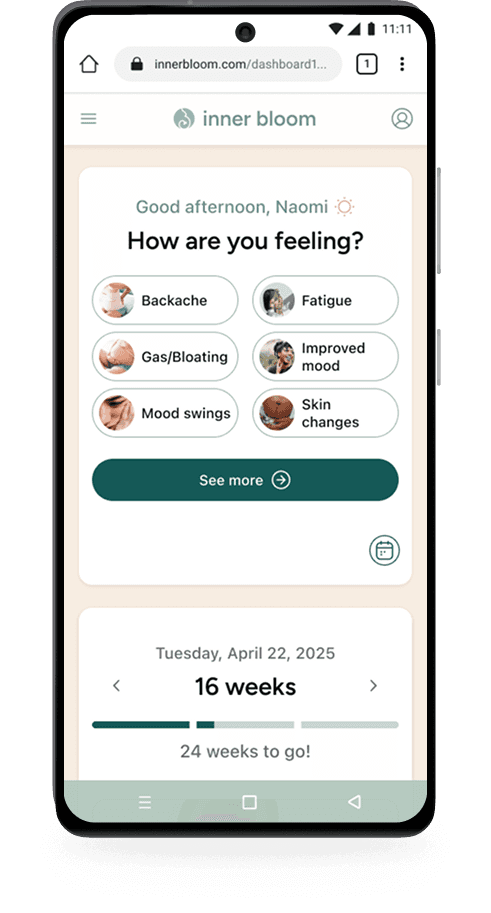
The Symptom Tracker is a daily check-in that helps users log how they’re feeling as symptoms change day to day.

The Symptom Tracker is a daily check-in that helps users log how they’re feeling as symptoms change day to day.

Based on their input, the system delivers tailored, symptom-specific content and leads into Advice Meets Experience. This keeps information relevant, manageable, and supportive.

Based on their input, the system delivers tailored, symptom-specific content and leads into Advice Meets Experience. This keeps information relevant, manageable, and supportive.

Symptom Tracker flow

Symptom Tracker flow

Symptom Tracker flow

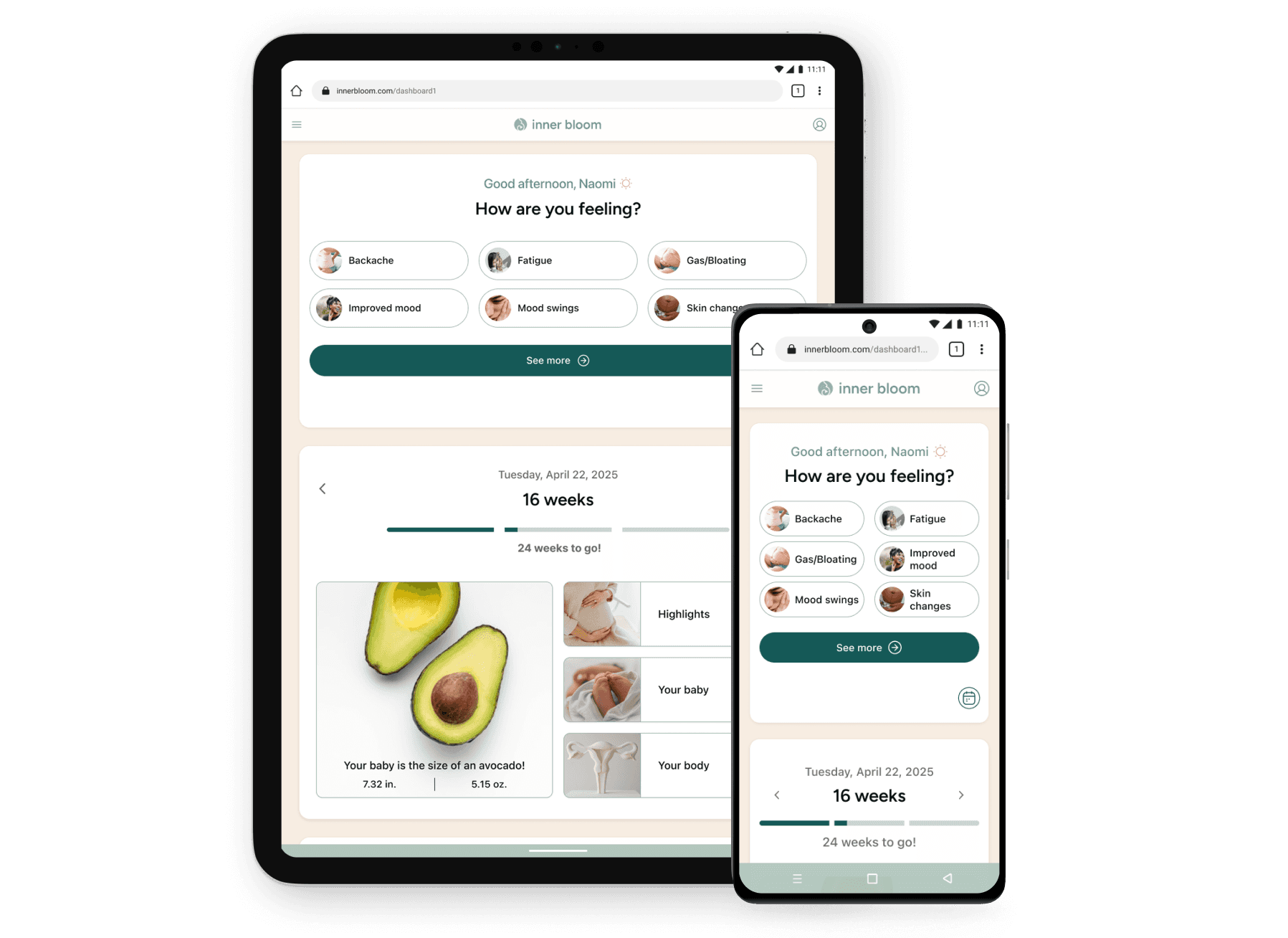
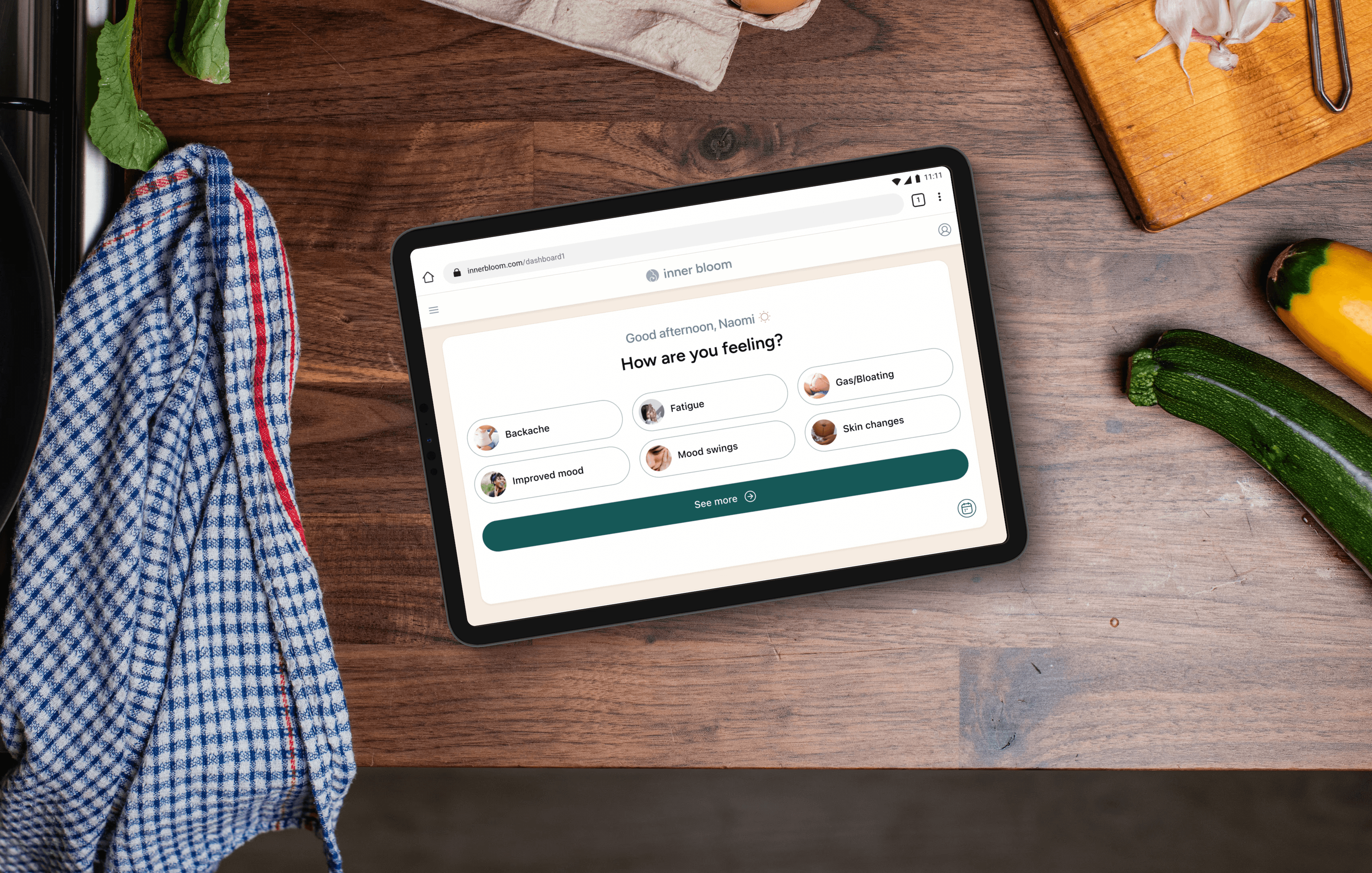
Upon loggin in, users are prompted with “How are you feeling today?” appearing first on the dashboard. This is intentional so that symptom responses remain uninfluenced by weekly medical updates.
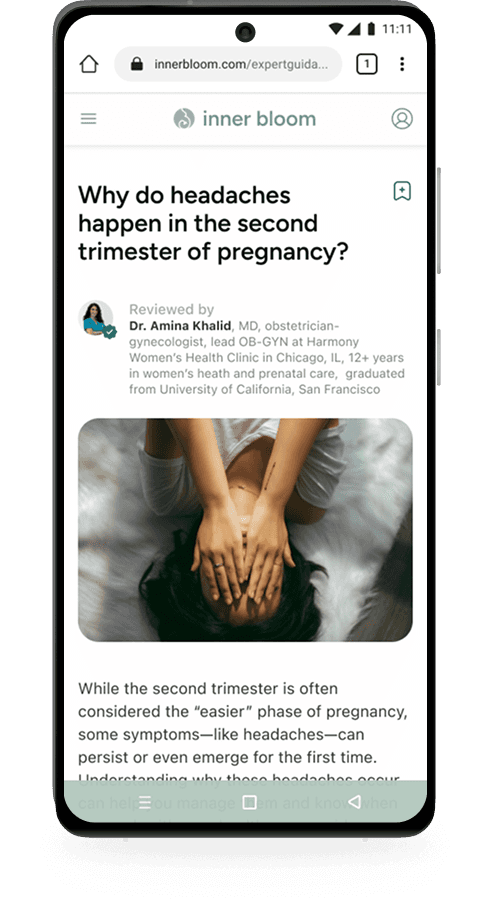
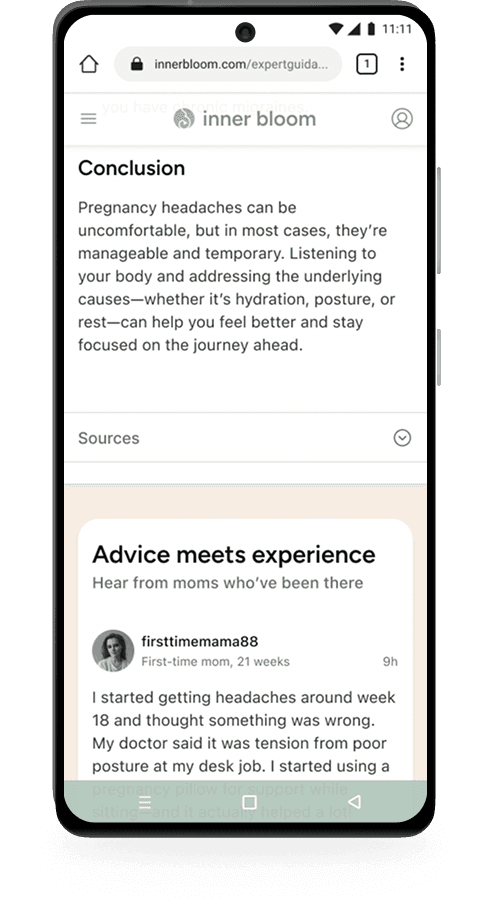
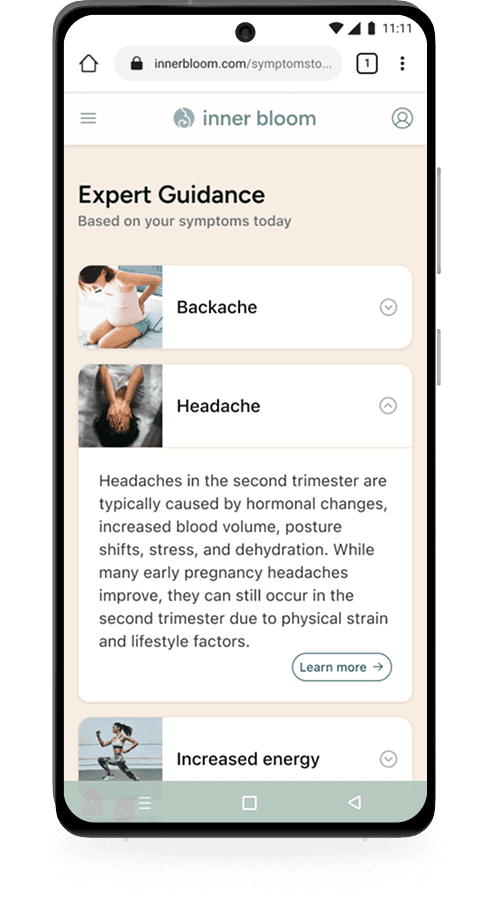
Based on what users log, the system surfaces bite-sized info cards with brief symptom explanations. Users can read the full summary or tap "learn more" for a full article, with then flows directly into Advice Meets Experience.

symptom display

symptom display

symptom display

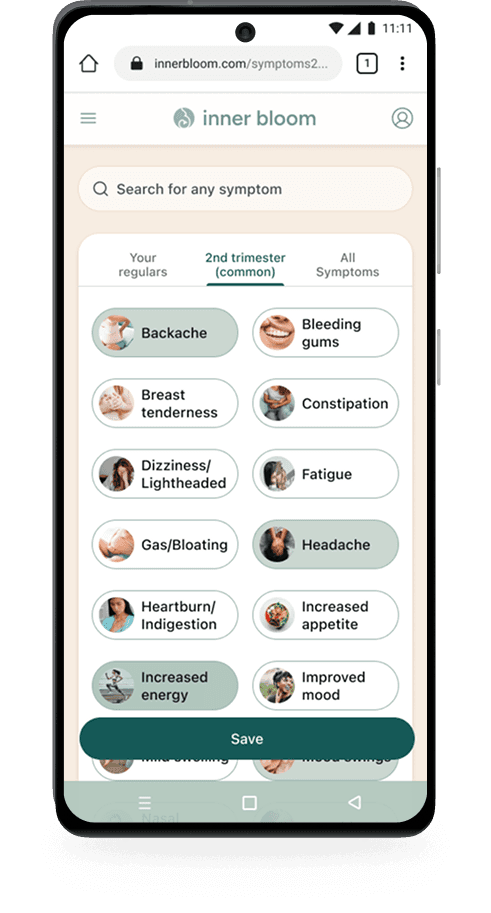
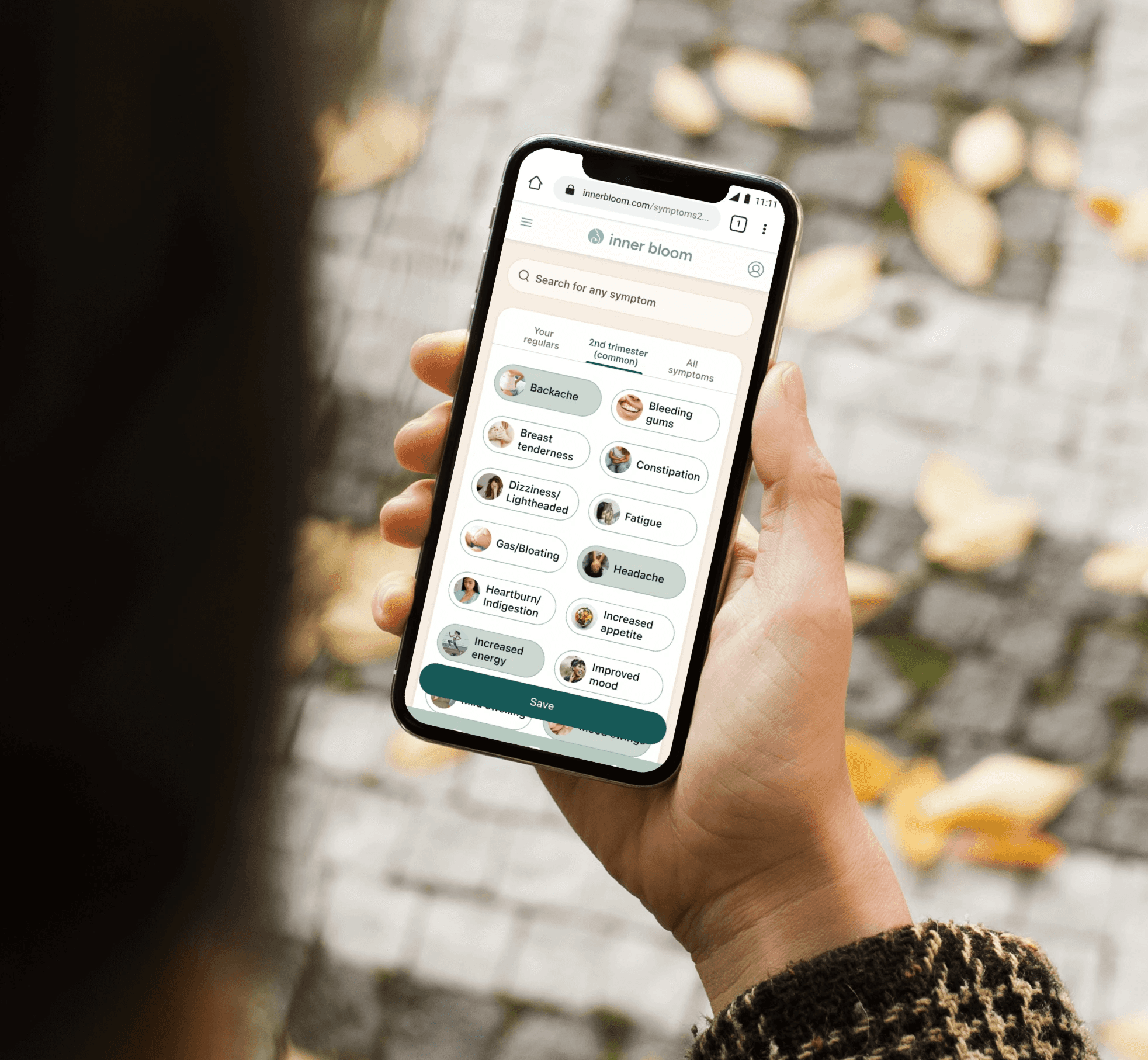
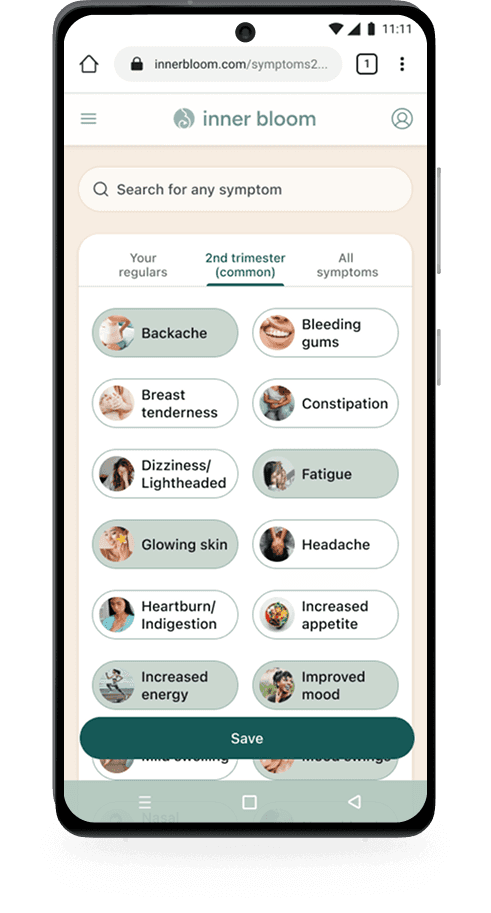
The symptom list went through several iterations. Two tabs became three - adding "your regulars" for frequently logged symptoms. The trimester tab was relabeled to include "common" to prevent users from worrying that anything not listed was abnormal. Symptom buttons were tested from one to four per row - two felt best, spacious enough to scan without excessive scrolling. Each button included a small illustrative image to reduce text monotony.

Throughout, information was structured in layers: a brief summary first, with a "learn more" option for those wanting depth.
MVP feature 2

MVP feature 2

MVP feature 2

Chronology Tracker

Chronology Tracker

Chronology Tracker

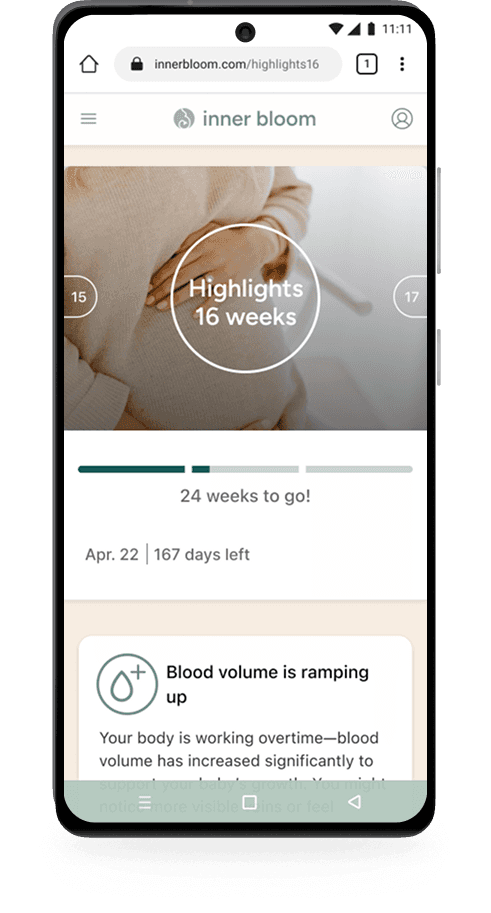
The Chronology Tracker provides stage-based guidance, helping users understand what to expect throughout their pregnancy.

The Chronology Tracker provides stage-based guidance, helping users understand what to expect throughout their pregnancy.

It surfaces timely updates on baby development and body changes, then connects users to deeper insights through Advice Meets Experience. This creates a clear, structured way to navigate pregnancy over time.

It surfaces timely updates on baby development and body changes, then connects users to deeper insights through Advice Meets Experience. This creates a clear, structured way to navigate pregnancy over time.

Chronology Tracker flow

Chronology Tracker flow

Chronology Tracker flow

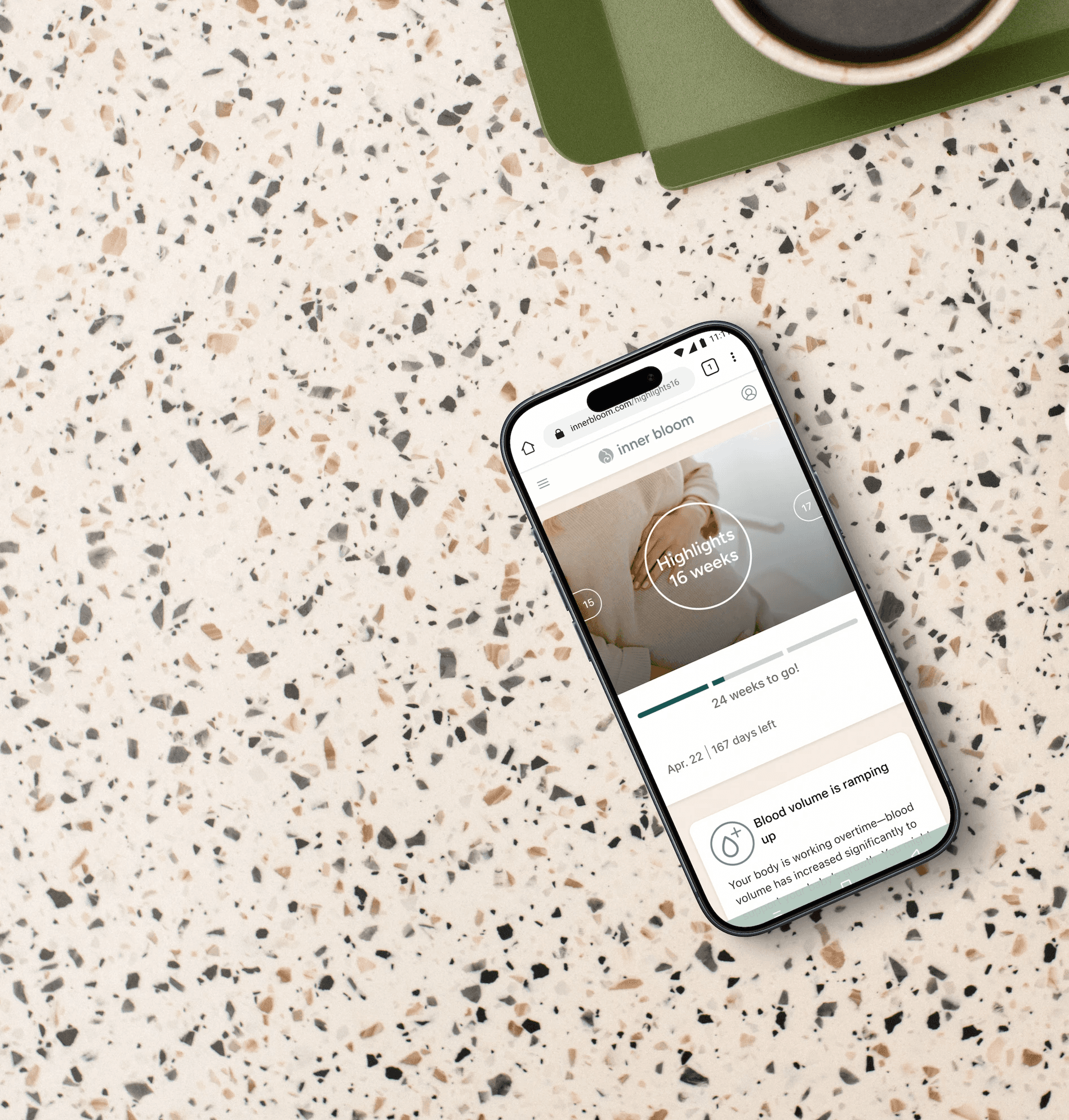
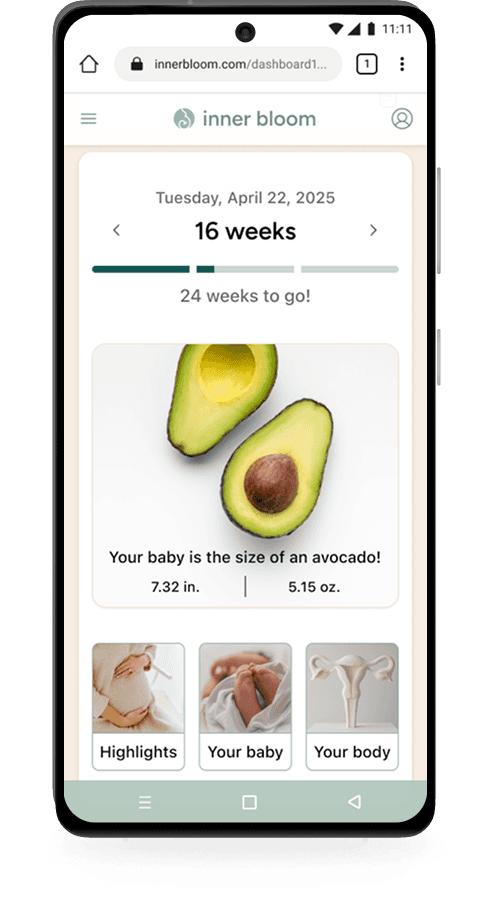
From the dashboard, users can access time-specific updates, including weekly highlights, baby development, and body changes. Each section opens with a brief summary card, with the option to go deeper.
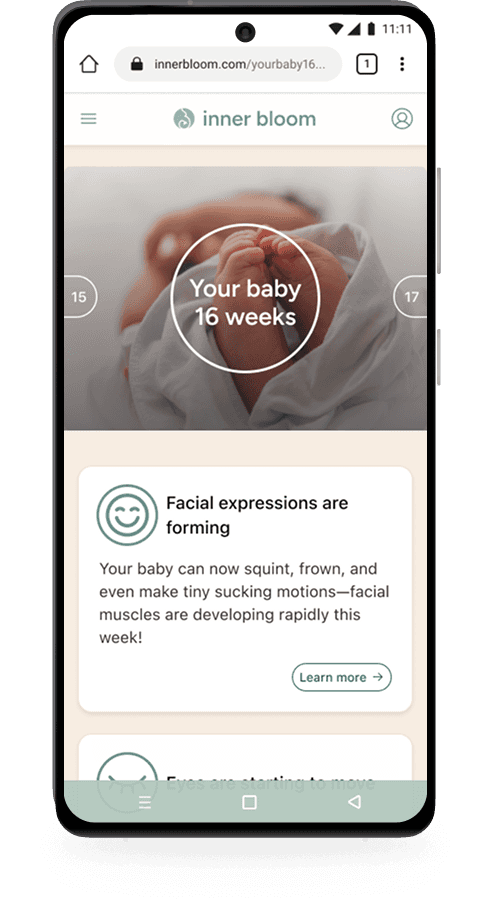
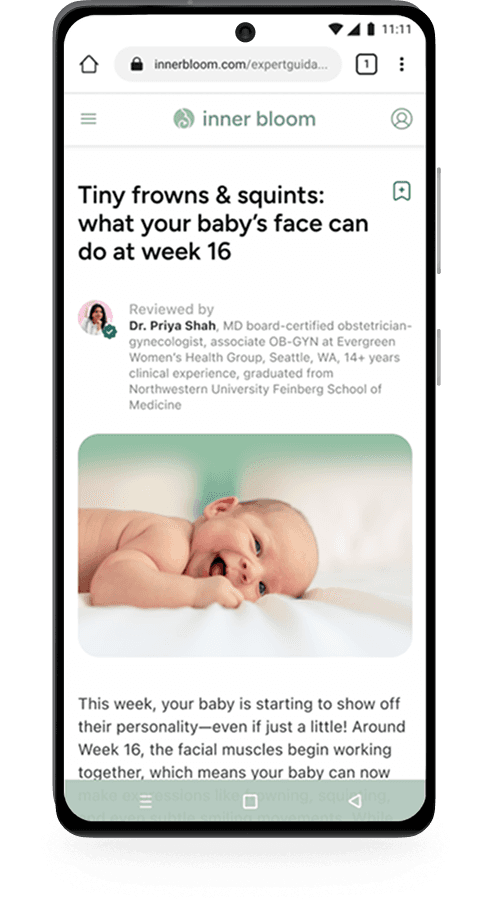
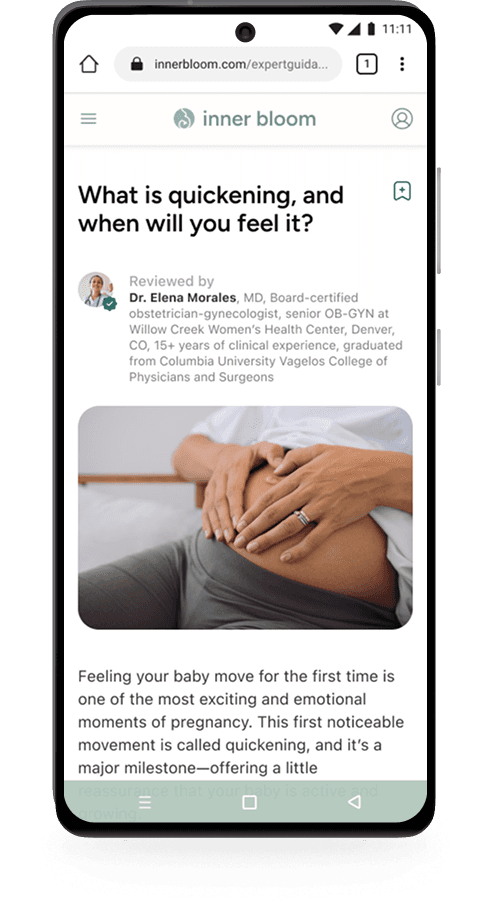
If users choose to continue, they are taken to a full, expert-backed article tailored to their current stage. Each article then leads into Advice Meets Experience, where users can explore peer perspectives related to that specific topic.
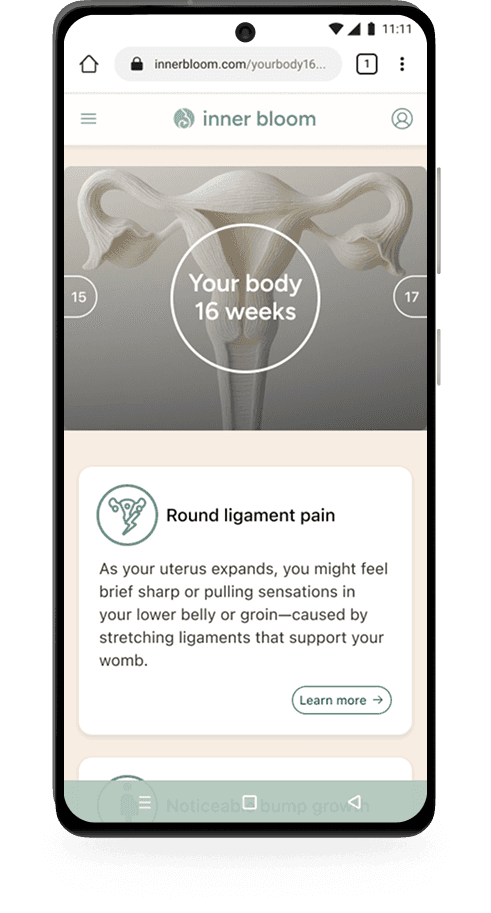
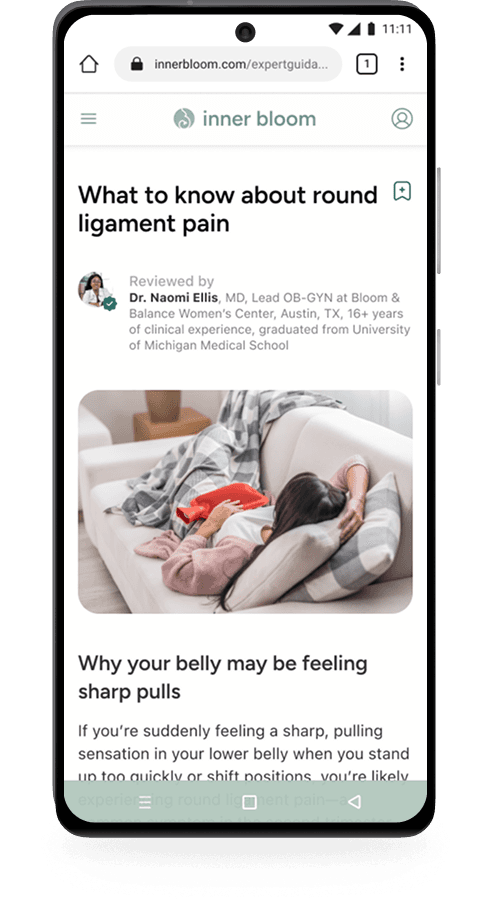
This flow allows users to quickly scan relevant updates or dive deeper, while consistently connecting structured medical guidance with real-life experiences.

dashboard hierarchy

dashboard hierarchy

dashboard hierarchy

Placing the following feature, Chronology Tracker, first risked influencing how users reported symptoms. If they read what they *should* be feeling this week, their answers might reflect that rather than their actual experience. Leading with "How are you feeling today?" kept responses uninfluenced and immediately made users feel seen.

Weekly updates from the Chronology Tracker followed, including a fruit or vegetable size comparison - a lighthearted element users genuinely appreciated.

The full article library and full community forum moved to the hamburger menu, keeping the dashboard focused on the current moment.
MVP feature 3

MVP feature 3

Advice Meets Experience

Advice Meets Experience

Advice Meets Experience

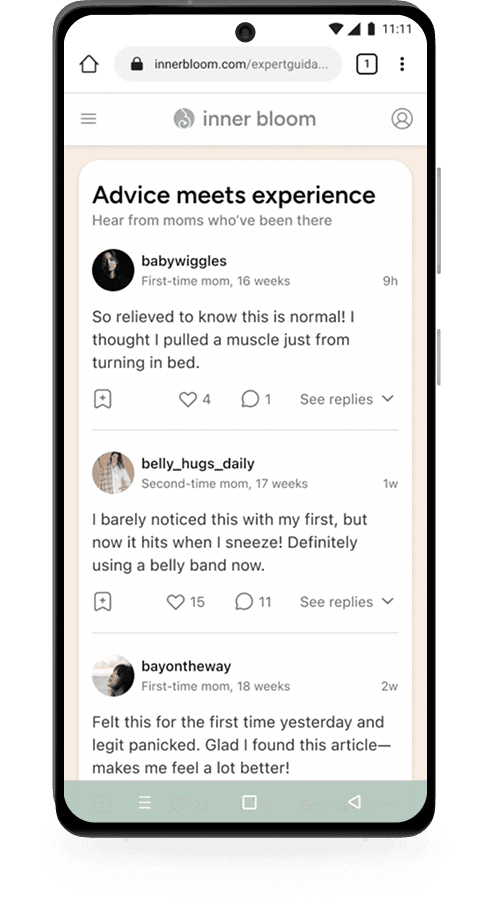
Advice Meets Experience is where personalized medical guidance and real-life perspectives come together.

Advice Meets Experience is where personalized medical guidance and real-life perspectives come together.

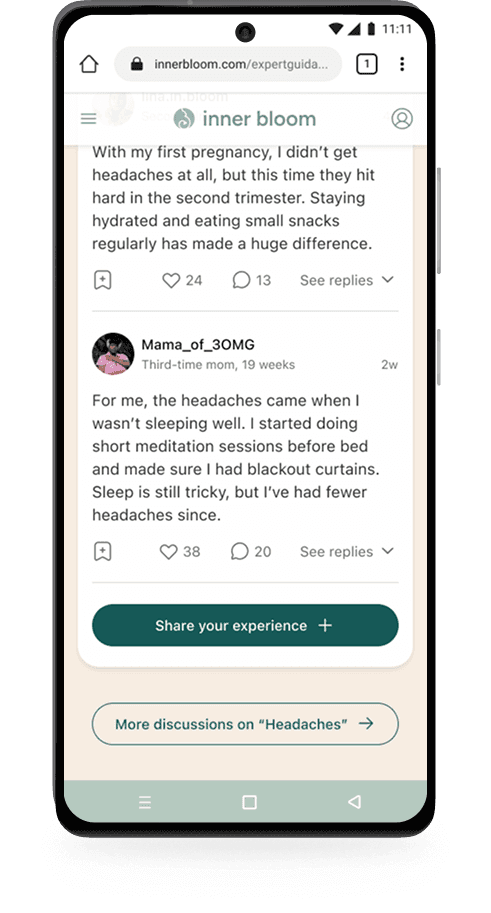
Users can explore expert-backed information alongside shared experiences from others, helping them validate what they’re learning and feel more supported. This bridges the gap between clinical advice and the diverse realities of pregnancy.

Users can explore expert-backed information alongside shared experiences from others, helping them validate what they’re learning and feel more supported. This bridges the gap between clinical advice and the diverse realities of pregnancy.

Advice Meets Experience flow

Advice Meets Experience flow

Advice Meets Experience flow

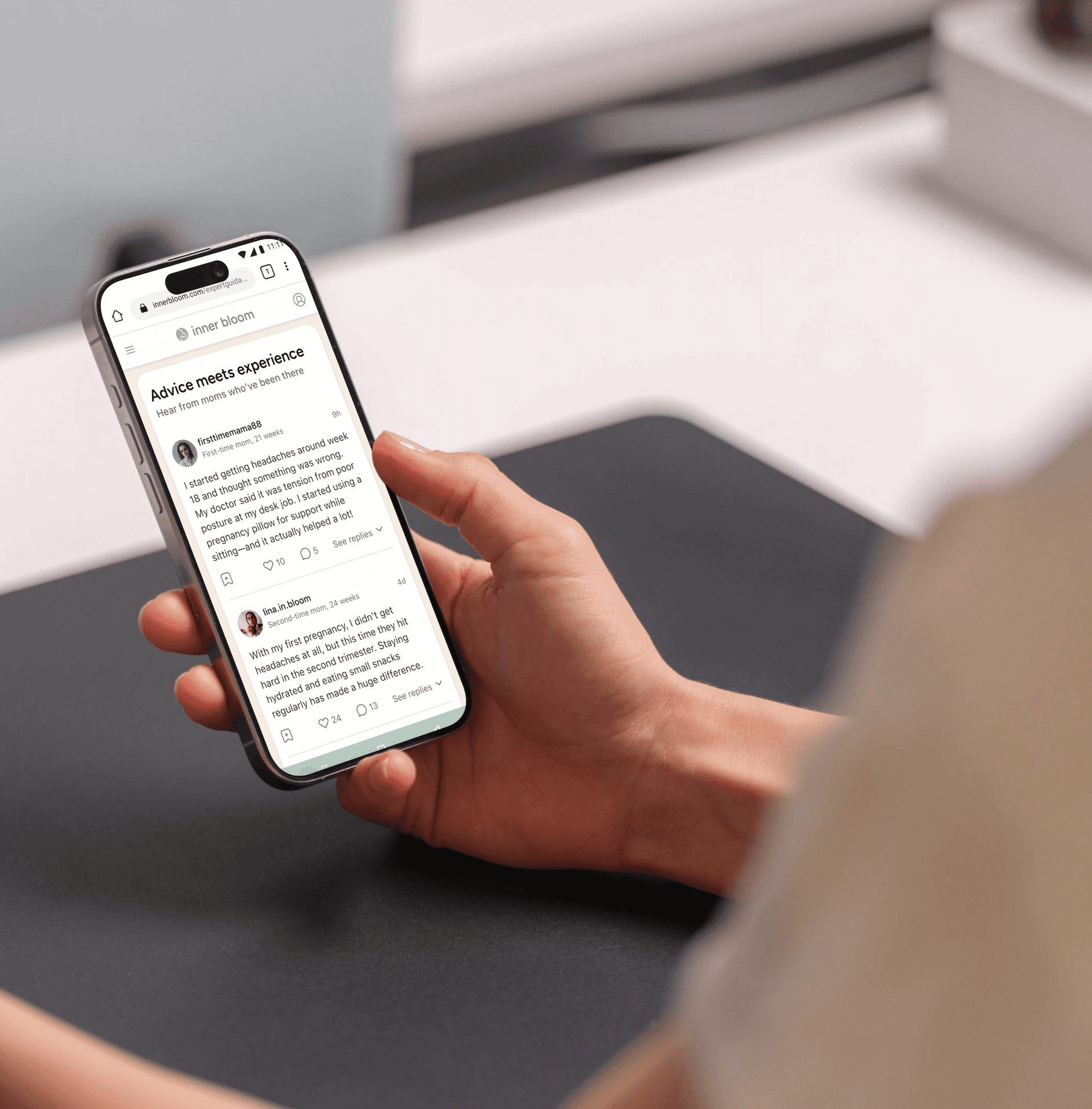
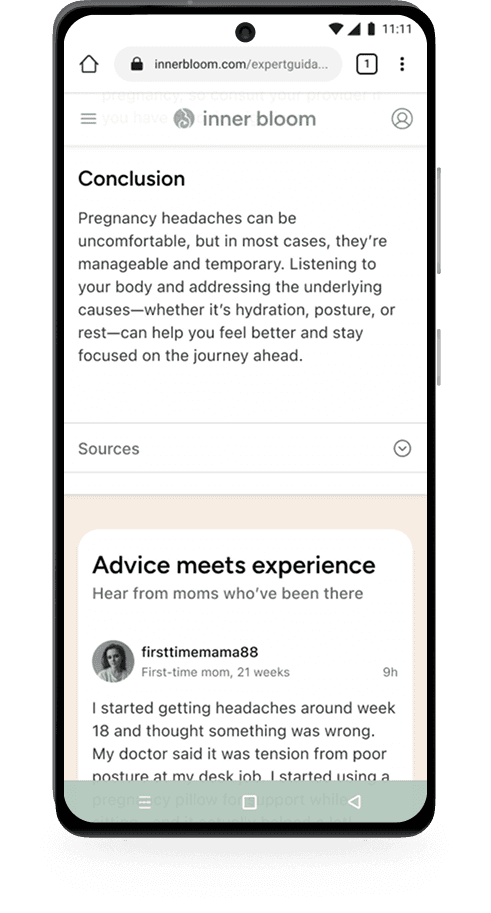
After reading a full article, users are guided into a space where others share how their own experiences compare.
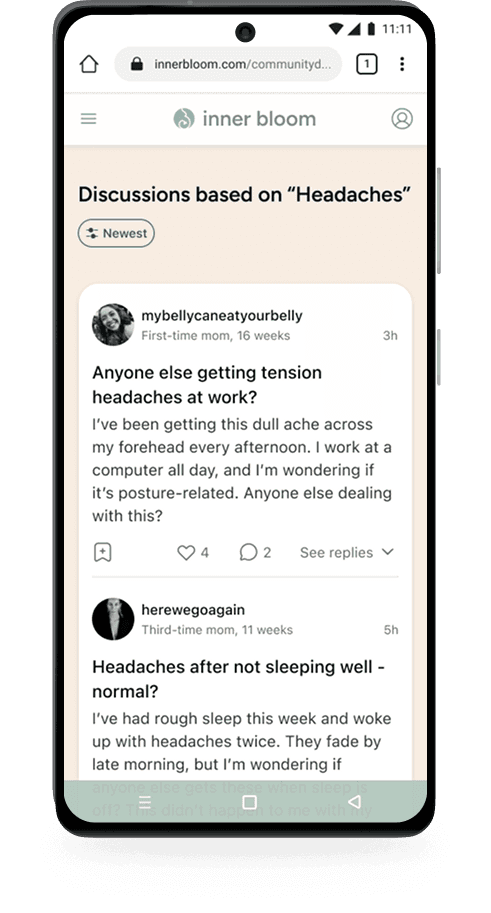
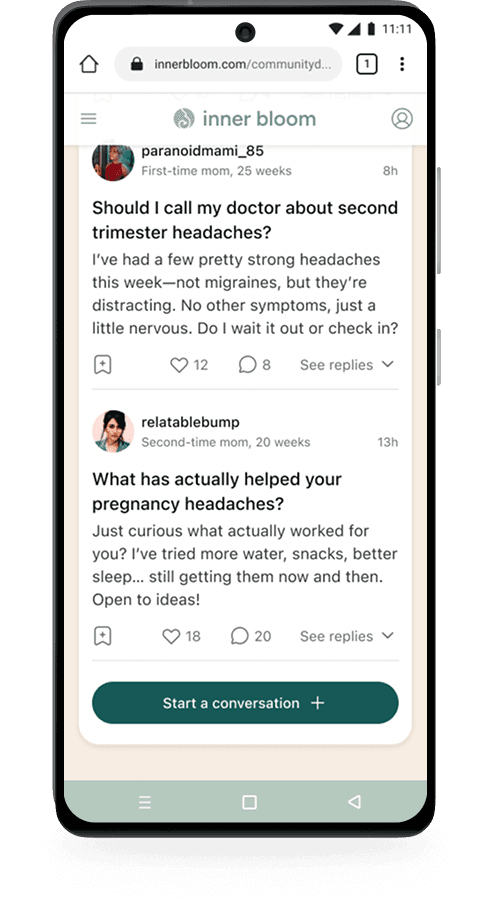
Users can scroll through related stories, validate whether their experience aligns, and contribute their own. A dedicated Community Discussions thread allows for deeper exploration. The flow moves continuously from understanding to reassurance, helping users feel both informed and supported.
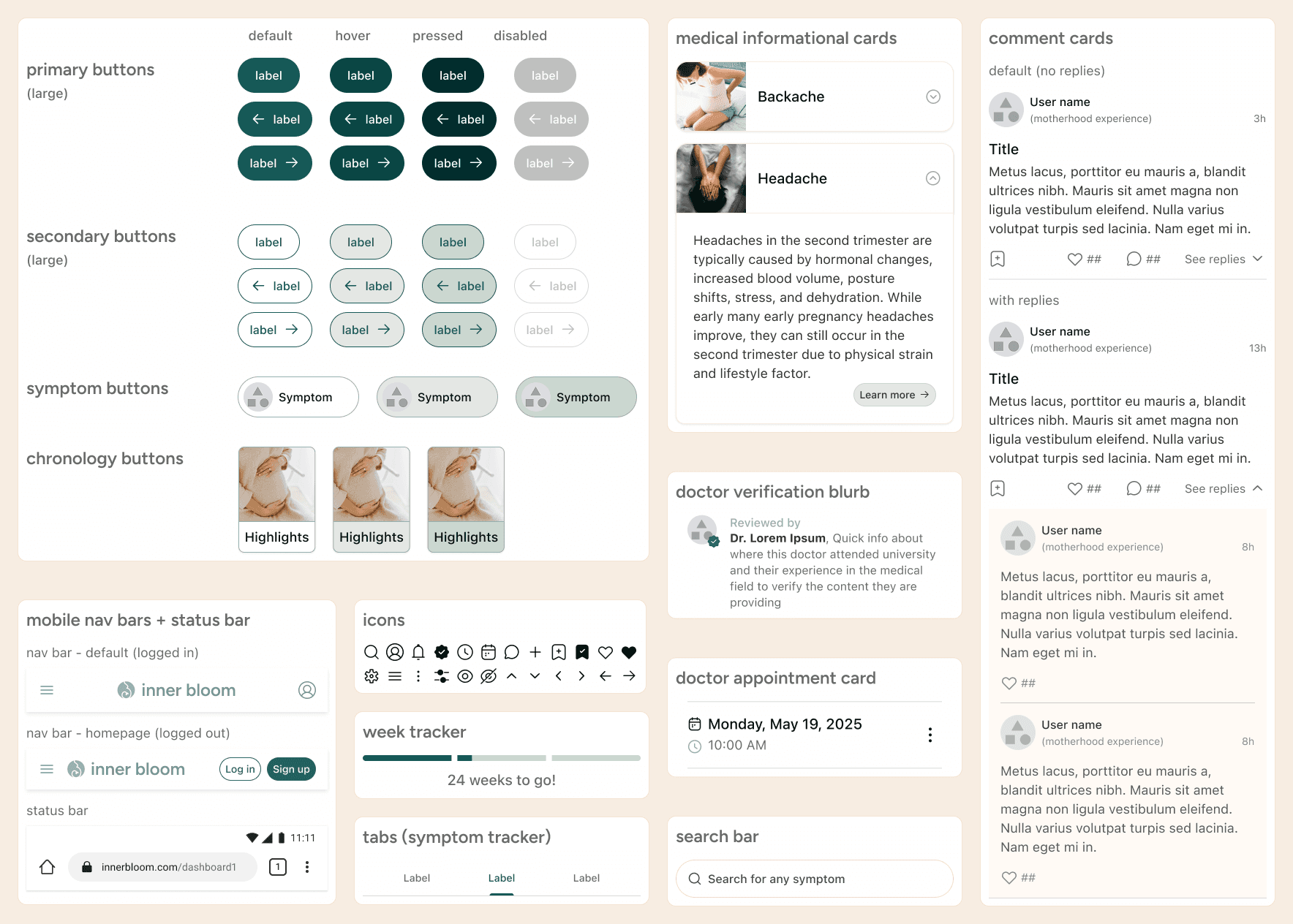
UI & Branding

UI & Branding

Information is presented through layered, bite-sized components that progressively reveal more detail, allowing users to move from quick reassurance to deeper understanding without feeling overwhelmed.
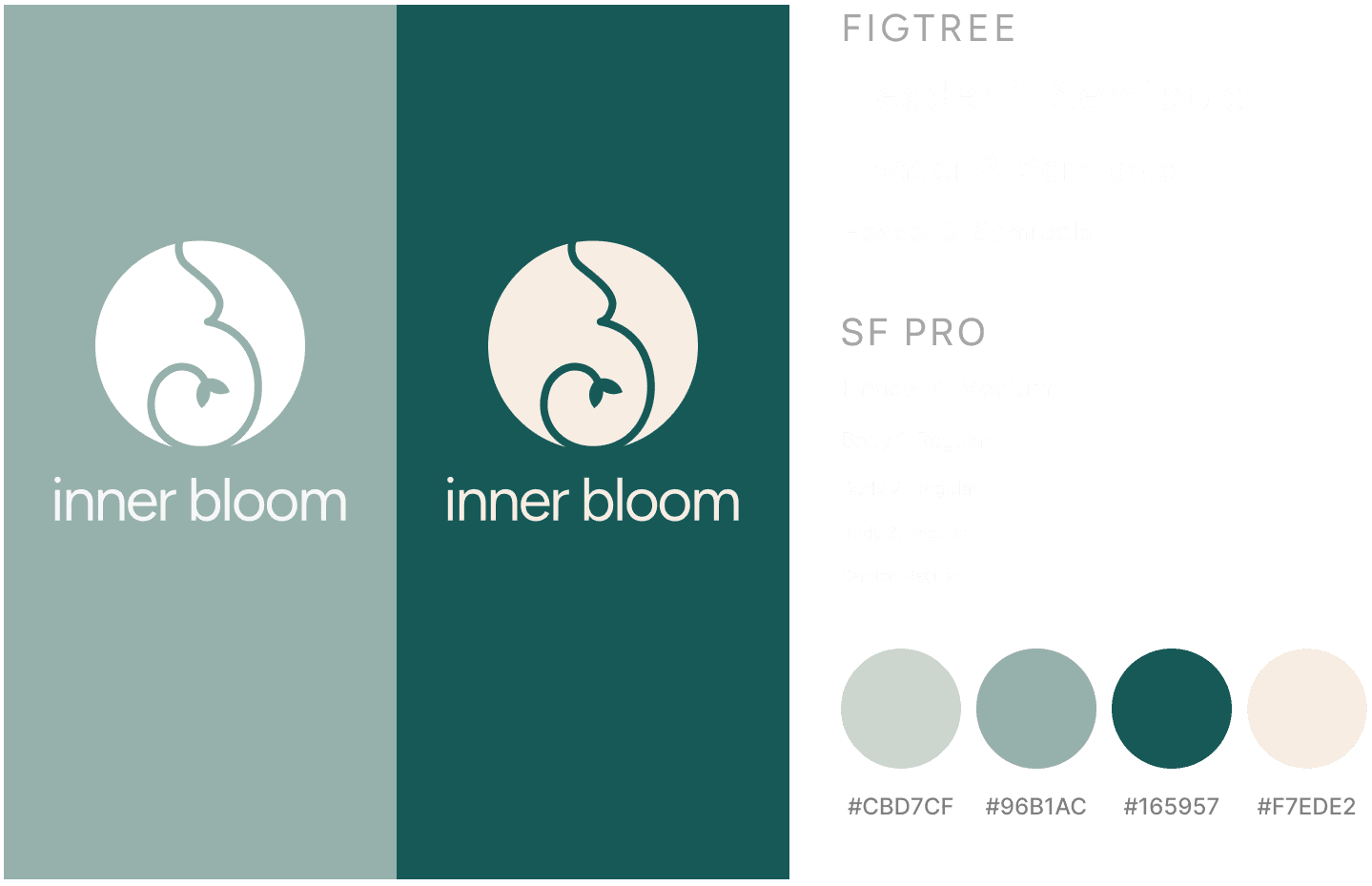
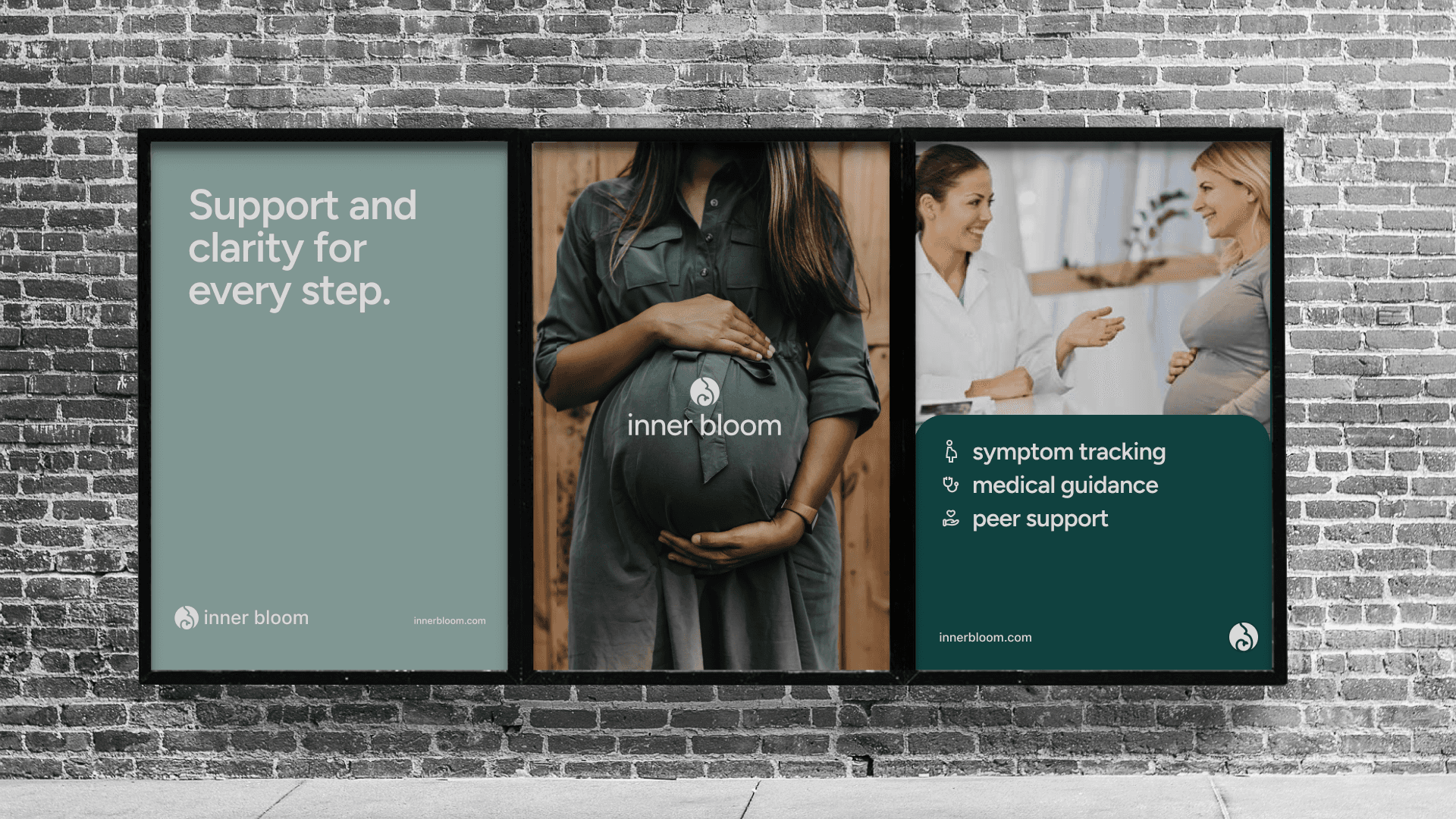
The name InnerBloom reflects growth from within - personal transformation, care, and empowerment throughout pregnancy. The logo combines a soft sweeping curve evoking a pregnant belly with a growing sprout, symbolizing nurturing and gentle progress. The color palette (muted sage, deep teal, and warm neutrals) creates a calm, grounded atmosphere that supports users emotionally while maintaining clarity. SF Pro ensures legibility for information-heavy content; Figtree adds warmth and personality in headings, balancing clarity with empathy.
Testing the experience

Testing the experience

Moderated usability testing was conducted with five expecting mothers. Sessions evaluated whether Inner Bloom helped users navigate pregnancy information with ease, access content relevant to their stage and symptoms, and feel reassured through a balance of medical guidance and shared experience. Testing also assessed whether the UI (color palette, typography, and information density) supported a sense of calm rather than overwhelm.

Moderated usability testing was conducted with five expecting mothers. Sessions evaluated whether Inner Bloom helped users navigate pregnancy information with ease, access content relevant to their stage and symptoms, and feel reassured through a balance of medical guidance and shared experience. Testing also assessed whether the UI (color palette, typography, and information density) supported a sense of calm rather than overwhelm.

what needed work

what needed work

what needed work

what needed work

problem

solution

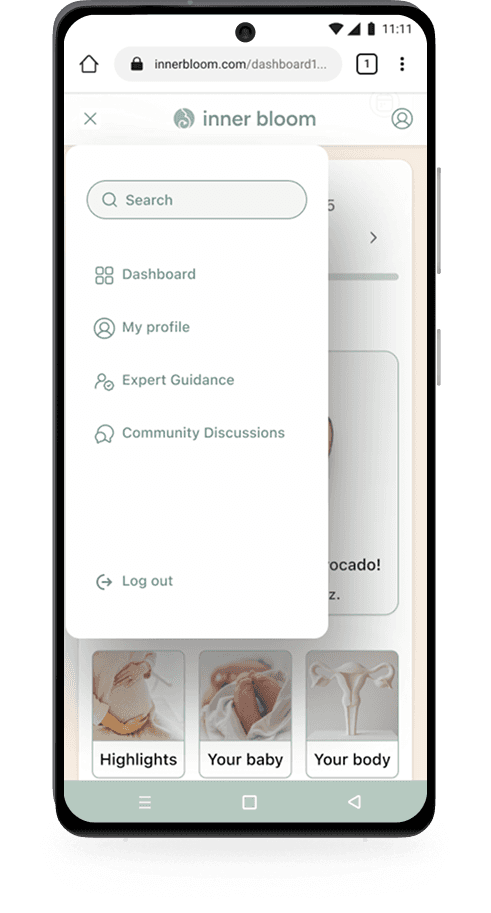
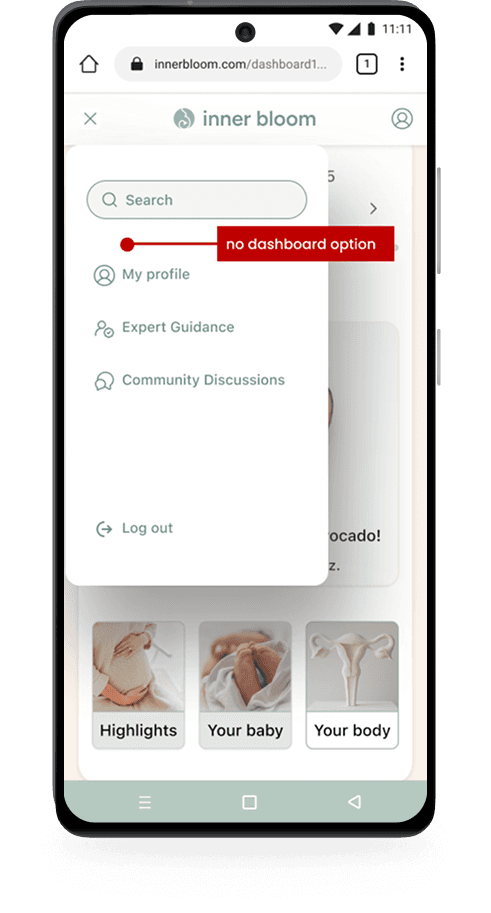
problem: most users tried to navigate back via the hamburger menu rather than the logo solution: a dashboard option was added to the hamburger menu alongside the existing logo shortcut
problem
solution

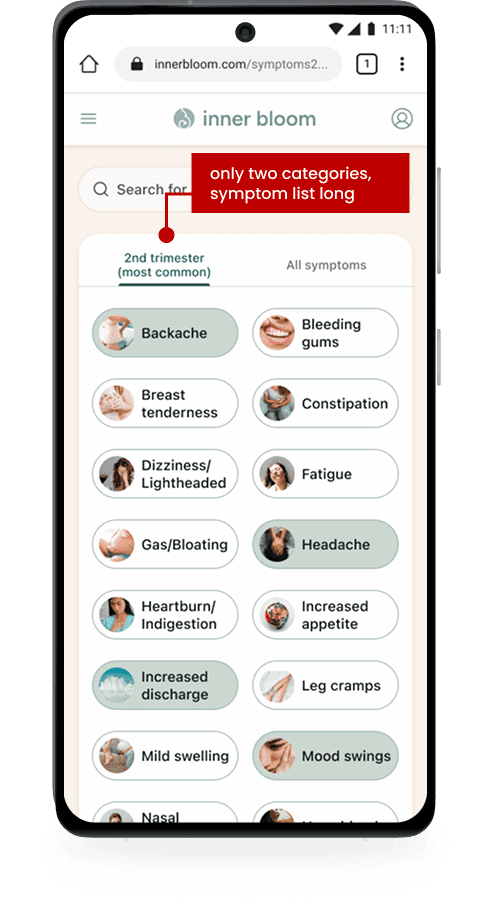
problems: - no positive pregnancy symptoms were included in the initial symptom list - users found the volume of options slightly overwhelming solutions: - positive symptoms were added (increased energy, improved mood, glowing skin...) - "your regulars" tab was introduced for more personalized filtering
problem
solution

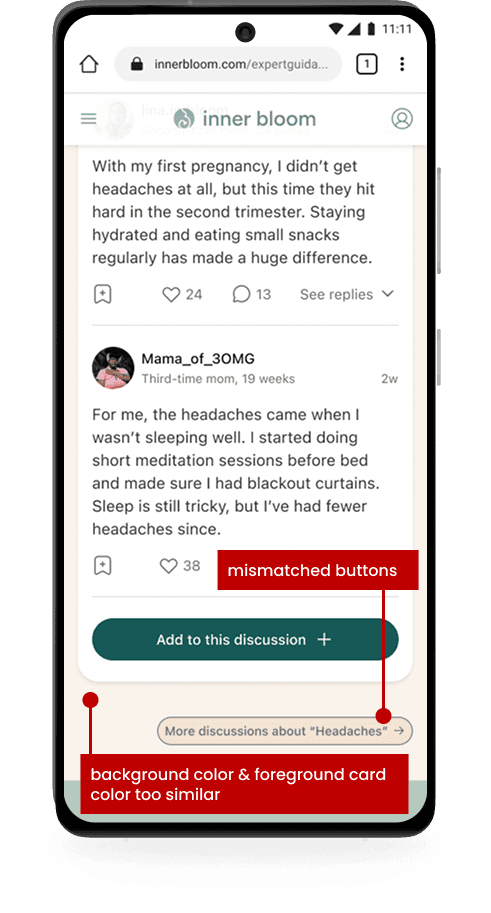
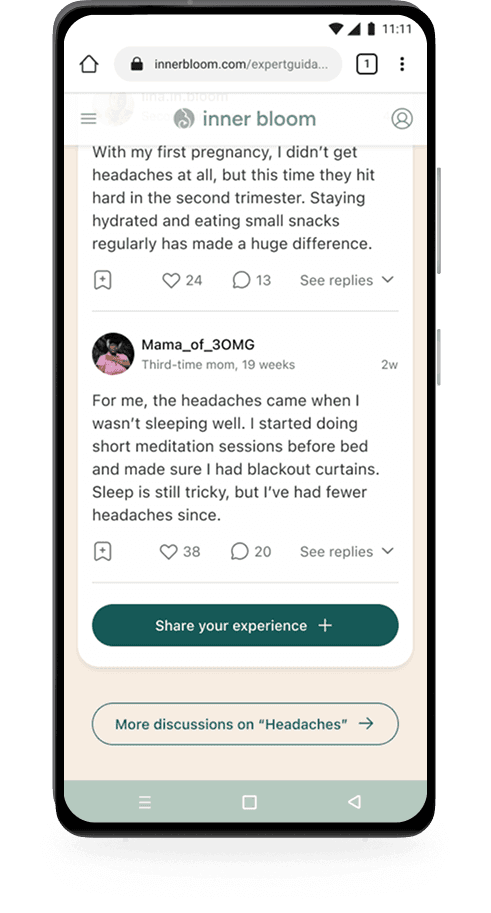
problems: - background and foreground contrast needed strengthening - inconsistent button colors made primary and secondary actions feel mismatched solutions: - background contrast was increased slightly - secondary button colors were adjusted for clarity

what worked

what worked

what worked

what worked

1. Advice Meets Experience

1. Advice Meets Experience

  • the most appreciated feature across all sessions, directly validating the core research insight: users strongly wanted a bridge between professional guidance and peer experience

2. navigation + UI

2. navigation + UI

  • navigation was consistently described as straightforward, easy, and uncomplicated

  • the UI was noted as simple, clean, and calming - contributing to users expressing they would use the product in real life

3. personalization + digestible information

3. personalization + digestible information

  • users appreciated content tailored to their current stage and symptoms, and valued the bite-sized info cards that allowed quick scanning without committing to full articles

project results

project results

project results

project results

Overall, testing confirmed that InnerBloom's approach effectively supports expecting mothers by prioritizing clarity, personalization, and emotional reassurance. Tailored content, digestible information, and integrated peer perspectives reduced overwhelm and built trust, while the calming visual design reinforced a sense of support throughout.

view prototype

Reflections

Reflections

challenges

challenges

challenges

challenges

The emotional sensitivity of the subject matter was the primary lens for every decision. As someone navigating pregnancy at the same time as this project, I had firsthand understanding of how it feels to receive information when you're already overwhelmed. Being a user and a designer simultaneously was genuinely useful, though it requried staying conscious of the distinction between my own experience and what research was telling me. The most challenging design problem was information architecture. Pregnancy as a subject is essentially boundless. Every decision about what to include required asking: what is absolutely essential? A focused MVP scope kept that question answerable: daily symptoms and weekly development updates became the non-negotiables, and everything else was deffered.

key learnings

key learnings

key learnings

key learnings

This project deepened my understanding of designing for emotional needs alongside functional ones. Feeling understood, supported, and not overwhelmed aren't soft requirements - for expecting mothers navigating a sensitive and often anxious experience, they're the whole point. Even small UX decisions, like what appears first on the dashboard or how many symptom options are visible at once, had a measurable impact on how safe and confident users felt.

areas for improvement

areas for improvement

areas for improvement

areas for improvement

Presenting complex medical information in a way that feels manageable is an ongoing challenge. I want to continue refining how content is layered and delivered, particularly for users already experiencing stress, so that the experience consistently feels supportive rather than clinical.
next steps

next steps

next steps

next steps

Future iterations would expand beyond the MVP to include fuller community and medical support content, additional postpartum resources, and a more complete sitemap. These all reflect topics that came up consistently across user interviews.

Future iterations would expand beyond the MVP to include fuller community and medical support content, additional postpartum resources, and a more complete sitemap. These all reflect topics that came up consistently across user interviews.

THANK YOU FOR EXPLORING MY WORK ~

Please reach out, I'd love to chat.

Please reach out, I'd love to chat.